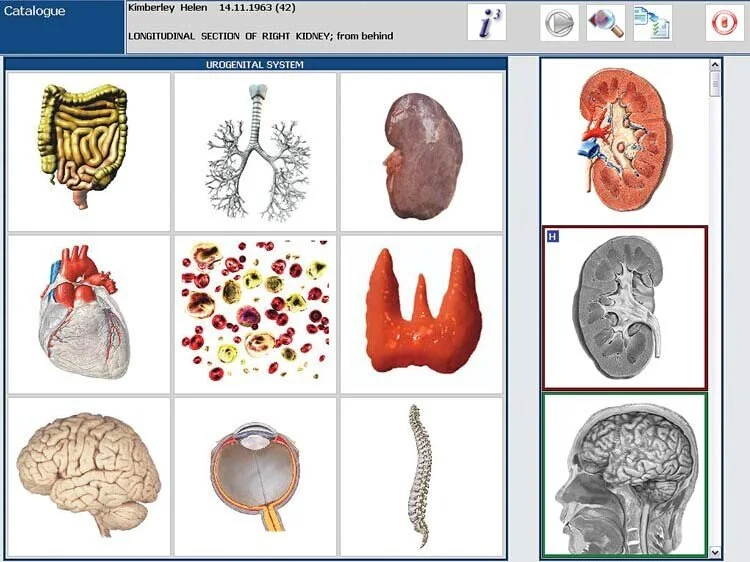
An NLS device (nonlinear scanning / bioresonance-style analyzer) is an adjunctive assessment tool that generates pattern-based reports from software-driven scans; for a U.S. holistic practice the single-sentence takeaway is: you may find NLS useful as a low-cost, non‑invasive screening and conversation starter, but it is not a standalone diagnostic test—use it only to inform intake, monitor subjective change, and guide decisions about conventional testing or referrals.
Contents
What an NLS device is — a clear description for clinic use
We describe NLS (nonlinear scanning) devices as hardware + software packages that use biofeedback-style sensors and database-driven pattern matching to produce images and reports the vendor calls “analyses” of organs, systems, or energetic parameters. In practice these systems deliver interactive visual reports, suggested areas of interest, and software tools framed as clinical support—not as replacement for laboratory tests, imaging, or licensed medical diagnosis.
Common, realistic use cases in holistic and functional clinics
For clinicians working in integrative and holistic settings, we see practical, repeatable uses that fit scope-of-practice and help workflow:
Initial intake augmentation: a visually oriented report helps engage clients and structure symptom review, especially when clients expect an objective-looking screen-based assessment.
Tracking subjective response: practitioners use repeat scans to document changes in reported symptoms, lifestyle, or supplement programs over weeks or months, treating the device output as one of several outcome measures.
Screening for referral flags: the device may highlight organ systems or patterns you then check with lab tests, imaging or medical referral—useful as a triage aid rather than a conclusive result.
Client education and compliance: structured graphics and suggested “areas of interest” can make lifestyle or compliance conversations more concrete for some people.
Complement to functional testing: when combined with detailed intake, dietary logs and targeted functional labs, NLS output can help prioritize which conventional tests to order first.
Evidence-aware summary: what NLS devices can and cannot provide during an intake or follow-up session
What NLS devices can reasonably provide in-clinic:
Visual reports and pattern-based suggestions that support clinical interviewing and goal-setting.
Repeatable screen output that some clinics use to document perceived change when paired with symptom scales.
Noninvasive, rapid scans that are easy to add to an appointment flow and that some vendors claim are compatible with standard Windows systems (confirm the exact supported OS for your unit).
What they cannot and should not be presented as:
Independent diagnostic proof of disease. NLS output is not a substitute for laboratory, radiologic, pathological, or licensed medical evaluation.
Regulatory or FDA-cleared claims unless a specific model has documented clearance; verify any vendor statements about approval or clinical claims in writing.
Therapeutic directives. Do not present device-generated “corrections” or suggested remedies as proven medical treatments without independent evidence.
Relevant vendor-declared product facts (examples you should verify)
When you evaluate any supplier, look for concrete, model-level statements such as supported software name and version, supported operating systems, warranty, lead time and minimum order quantity. For example, a Metatron Hunter device listing shows software names and OS compatibility and a one‑year warranty—verify the same items on the quote you receive.
Practical risks and limits to accept
Relying on NLS output without parallel standard testing risks missed diagnoses and scope-of-practice problems. Misstating device capability to clients or to other clinicians can expose your practice to complaints, regulatory scrutiny, or malpractice risk if clinical decisions are made solely on the device output. Always record how NLS contributed to a clinical decision and, where relevant, follow up with verified tests.
Regulatory and clinical notes U.S. practitioners must check before using NLS devices
Regulatory context matters more than marketing language. We recommend these actions before integrating an NLS device into your practice:
Confirm regulatory status: ask the vendor in writing whether the model has any U.S. regulatory clearances (FDA) or other jurisdictional approvals. Vendors sometimes list CE or ISO 9001—those do not equal FDA clearance.
Define scope-of-practice language for your documentation and consent forms: avoid medical diagnostic language in client-facing materials unless your state license covers that scope and you have independent evidence supporting the claim.
Train staff on permitted statements: limit claims to “screening support,” “software-generated report” or similar phrasing that avoids implying diagnosis.
Confirm data security and PHI handling: if the device or software stores client data, verify encryption, account controls and your obligations under HIPAA.
Practical session workflow: how to include an NLS scan in a 45–60 minute visit
Below is a clinic-ready example that keeps the scan as an adjunct rather than the centerpiece of care. Adjust times to match your style and regulations.
Pre-visit intake (5–10 min): Client completes a focused symptom questionnaire and consent form that includes an explanation of what the scan can and cannot show.
Initial clinician review (5–10 min): Clinician reviews red flags and decides whether immediate conventional testing or urgent referral is required before scanning.
Scan setup and baseline (5–8 min): Position client, attach sensors per manual, and run the vendor-recommended baseline protocol. Use the vendor-recommended patient ID and record the software version and scan file name in the chart.
Scan run (5–15 min): Perform the scan, saving raw output and auto-generated report. If your model offers multiple scanning modes, document which mode was used.
Review and discussion (10–15 min): Use the report to guide a targeted discussion—point out suggested areas of interest and explain limitations; avoid definitive diagnostic language.
Plan and documentation (5–10 min): Record actions: recommended labs, referrals, supplements, or lifestyle steps and schedule follow-up. Archive the report in the client record and note the device serial number, software version and operator initials.
Patient communication: explain NLS findings in plain, responsible language
We suggest a brief script and communication principles:
Script starter: “This report is a software-generated pattern analysis that points to areas we might investigate further. It is not a medical diagnosis.”
Be specific about uncertainty: use phrases like “suggests”, “flags”, “areas of interest” rather than “shows” or “confirms.”
Link to next steps: explain what follow-up testing or referrals are appropriate and why you recommend them.
Respect client expectations: some clients seek actionable deliverables—give them concrete, evidence-based next steps when possible and use the NLS output to support behavior-change coaching rather than as definitive proof of disease.
Clinical documentation: what to record and example report language
At minimum, record these items in the chart for each scan:
Device model and serial number, and the software name/version (capture exactly as shown).
Date/time of scan, operator initials.
Scan mode or protocol used.
Raw report file name, plus a short clinician summary of what you observed and the clinical actions taken (labs, referrals, treatments).
Client consent form acknowledging limitations of the device and data handling.
Example clinician summary sentence for the record: “2026-06-15: NLS scan performed (Metatron Hunter 4025, Hunter software v2026; operator LD). Report flagged hepatic and digestive pattern indices as areas of interest; plan ordered CMP and stool microbiome panel; client advised urgent care if jaundice, severe pain, or other red flags develop. Client signed NLS consent.”
Integration checklist: staff roles, training needs, space and IT considerations for a small clinic
Staff roles: designate a trained operator, a clinician who interprets and documents findings, and an administrative person responsible for archiving and billing codes.
Training needs: require vendor training on device operation, basic troubleshooting, data export, and security; supplement with in-clinic SOPs on permitted language and referral thresholds.
Space: a quiet, private room with a desk for the computer and a comfortable chair for the client. Ensure reliable AC power and a clean, sensor‑friendly environment.
IT: confirm the device software’s supported operating systems before purchase and keep copies of the installer and license keys in a secure location; require routine backups for client data and encrypted storage if PHI is kept.
Validation and evidence: how to check vendor claims and what documentation to request
Vendors commonly make performance or accuracy claims. We recommend you request the following in writing before purchase and keep them with the purchase record:
Exact model name and software version that will be shipped (for traceability to your installed unit).
Test reports or validation documents the vendor will share, with dates and authors—note that vendor self-reports are not independent verification.
Regulatory statements and any clearances or certifications; insist they provide the certificate image and holder name if they claim CE, ISO or other standards.
Warranty coverage, lead time, minimum order quantity and post-sale support options.
Example vendor-supplied facts to confirm on the quote: software name “Hunter” version “2026”, supported systems (Windows 11, Windows 10, Windows 8, Windows 7), warranty 1 year, lead time 2–5 days for a Metatron Hunter 4025 model—ask the supplier to include these exact phrases on the invoice or equipment sheet so your IT and purchasing teams can verify compatibility and service expectations. (These are examples of typical supplier claims; verify what your seller actually provides.)
Seller questions to ask and contract items to confirm before you buy or request a quote
When you contact a vendor for a clinic configuration or quote, ask the following and insist on written answers:
Exact model and software version that will be supplied; can the software be locked to your clinic license?
Supported operating systems and minimal PC hardware spec for reliable operation.
Warranty length and what it covers (onsite parts, remote support, software updates).
Service and training options (remote training session, training manual, scheduled updates).
Data export formats (can you export raw scan files and client reports in common formats such as PDF, CSV, or encrypted archive?).
Return, repair and replacement terms for defective units.
References or clinic installs (if the vendor offers references, treat them as starting points for due diligence; the references themselves are vendor-supplied information).
Comparison guidance: how to compare NLS devices without relying on marketing
Rather than vendor hype, use practical clinical criteria when comparing models:
Operational compatibility: does the software run on your clinic computer and is the hardware supported by your IT team?
Usability: ask for a remote demo or recorded scanner session and evaluate how quickly staff can learn to run a basic scan and save the report.
Documentation quality: manuals, consent templates, and troubleshooting guides are essential. Poor documentation is a real cost in staff time.
Support and spare parts: check warranty terms, remote support availability, and estimated lead times for replacements.
Data handling: whether the software allows secure export and local storage of client files.
Cost of ownership: total purchase price plus training, software licenses, and expected maintenance costs over two to three years.
Side-by-side model snapshot
Below is a compact comparison using vendor-declared model statements—use these only as a starting point and confirm with a written quote. Each cell that references a supplied product fact includes the data-fact-id attribute for traceability.
Model
Software / Version
Key declared features
Supported systems
Warranty / Lead time
Note: the declared “accuracy” number is vendor-provided for the Metatron Hunter 4025 model—treat this as a claim to be verified through documentation and, ideally, independent evaluation where clinically relevant.
When an NLS scan is helpful — and when traditional tests or referrals are required
Helpful when:
You need a rapid adjunctive scan for client engagement and preliminary triage.
You already plan conventional testing and want a structured way to prioritize which tests or referrals to discuss first.
Your practice documents subjective change over time and can legitimately add device output as part of composite outcome tracking.
Insist on conventional testing or referrals when:
Findings suggest acute or potentially serious medical conditions—obtain standard labs, imaging, or urgent medical evaluation.
The device report would change clinical management in a way that could harm the client without confirmatory testing.
Regulatory or payer requirements mandate validated diagnostic tests for reimbursement or legal compliance.
Validation and post‑purchase steps we recommend
After purchase, we advise these practical validation steps in your clinic:
Confirm delivered model and software version match the purchase order and record serial numbers.
Run several supervised, documented test scans against staff volunteers (with consent) to become familiar with variability and reporting quirks.
Compare device suggestions against known lab or imaging results in a small convenience sample from consenting clients—this is an internal validation exercise, not a formal study, and will help you understand concordance and limits.
Develop standardized intake and follow-up templates that incorporate the device output and emphasize confirmatory testing where indicated.
Seller and contract checklist (summarized)
Written confirmation of model, software version, supported OS and minimal PC spec.
Written warranty terms, lead time, MOQs and post-sale training details.
Clarify return and repair policy, and whether spare sensor kits or consumables are available.
Ask for sample output reports and the user manual before finalizing the purchase.
Request data-export capability and confirm whether reports can be saved as PDF for charting.
Practical judgments we make as a factory specialist
From the supplier side, we advise clinics to prioritize compatibility, documentation and serviceability over headline feature claims. A scanner that integrates well with your clinic computer, offers clear manuals and responsive support will have far greater clinical utility than a model that advertises more “features” but lacks dependable software updates or local-language support.
Short FAQ (focused follow-ups)
Can I use NLS output as a diagnostic report for insurance or medical records?
No. NLS output should be treated as adjunctive; verify payer and regulatory rules in your state. Record it in the chart as a software-generated report that informed clinical decisions, but do not substitute it for validated diagnostic tests required by payers or licensing boards.
What technical proof should I expect from a reliable vendor?
Expect a clear equipment sheet listing model, serial, software name/version, supported OS, warranty, and service terms. If the vendor cites certifications (CE, ISO 9001), ask to see the certificate image and holder name. Any clinical claims should be supported by independent publications or documented studies—if none are provided, treat clinical-accuracy claims cautiously.
One useful next step
If you want a tailored quote or to see sample reports and manual pages for the Metatron lines we supply, contact our U.S. sales representative with your clinic size and intended use-case. Provide the planned operator and clinic PC specs so we can recommend the right configuration and training package.
We also welcome inquiries from practitioners and potential U.S. distributors interested in local partnership and after‑sales support.
Required compliance note: This article is for general information only, cannot replace a physician’s diagnosis or treatment, and should not be used as a medical diagnostic basis.
This content is provided for learning, information sharing and professional communication only. It is not medical advice and is not a basis for treatment or diagnosis. Confirm suitability, operation and purchasing requirements against the product manual, local regulations and qualified professional guidance.