Troubleshooting Common Hunter 4025 Connection Issues
April 18, 2026
Connection problems can stop your diagnostic work cold. When your Hunter 4025 refuses to communicate with your computer, every minute counts. Practitioners across the United States face these challenges daily.
This guide walks you through proven solutions. You’ll discover why connections fail and how to fix them quickly. Most issues stem from simple causes that take minutes to resolve.
Whether you run a busy clinic or operate a wellness center, device downtime costs money. The Metatron Hunter 4025 NLS represents a significant investment in your practice. Keeping it running smoothly protects that investment.
Need Immediate Technical Support?
Our US-based team responds within 24 hours. Get expert help for your Hunter 4025 NLS connection issues right now.
Your 4025 NLS diagnostic analyzer needs specific conditions to function properly. The system connects through USB ports and requires particular software settings. Understanding these basics prevents most connection problems.
Essential System Requirements
The Metatron NLS diagnostic device works with specific operating systems. Your computer must meet minimum specifications for reliable operation.
Supported Operating Systems
Windows 2000 (legacy support)
Windows XP (32-bit and 64-bit)
Windows Vista (all editions)
Windows 7 (32-bit and 64-bit)
Windows 8 and 8.1
Windows 10 (all versions)
Windows 11 (latest tech)
Note: The Hunter 4025 NLS does NOT support Apple Mac OS, Linux, or Unix systems.
Minimum Hardware Specifications
Processor: 1 GHz Pentium III or higher
RAM: 512 MB minimum
Video Card: SVGA High Color 1024×768, 8 MB minimum
Hard Drive: 1 GB free space
USB Ports: Two available ports required
CD-ROM drive for software installation
Color printer recommended
Uninterruptible power supply (UPS) strongly recommended
Physical Connection Components
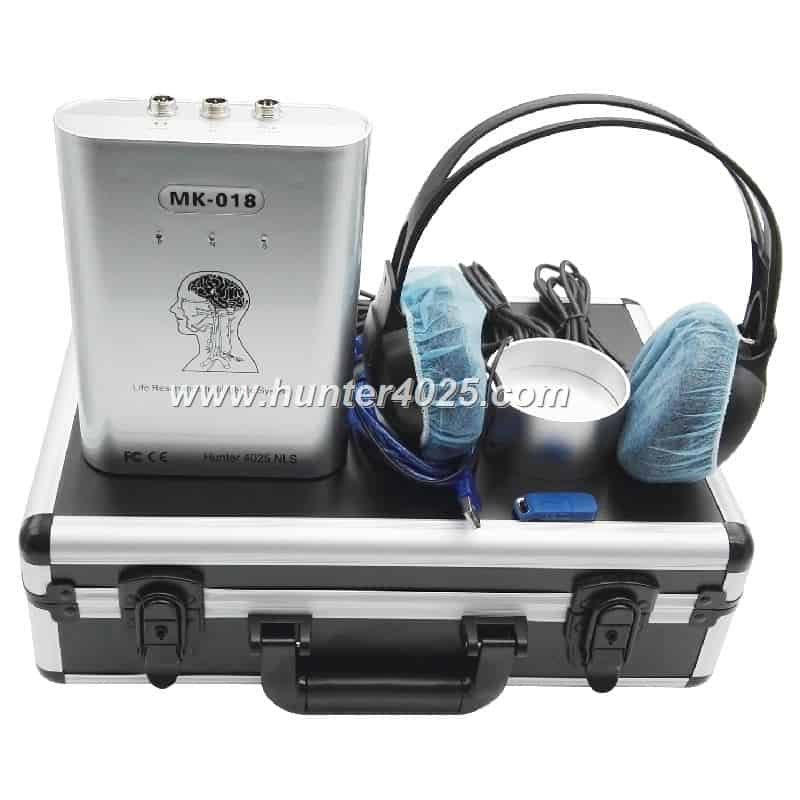
Your Meta Hunter 4025 package includes specific cables and components. Each piece plays a role in establishing stable connections.
Component
Quantity
Purpose
Common Issues
Main Host Unit
1
Primary diagnostic processor
Power indicator failure, physical damage
Headphone Light Sensor
1
Patient signal capture
Sensor malfunction, loose connections
Blue USB Cable
1
Computer to host connection
Cable damage, loose ports
Black Connection Cable
2
Sensor to host linkage
Internal wire breaks
USB Dongle
1
Software authorization
Driver conflicts, port compatibility
Testing Cup
1
Sample analysis
Contamination, physical cracks
Diagnosing Your Hunter 4025 Connection Problem
Connection failures fall into distinct categories. Identifying the specific problem type speeds up your repair process. Most practitioners can resolve these issues without external support.
USB Port Recognition Failures
Your computer fails to detect the 4025 NLS diagnosticdevice. This represents the most common connection complaint among users nationwide.
Quick Diagnostic Steps
Open Windows Device Manager (Right-click Start button, select Device Manager)
Expand “Universal Serial Bus controllers” section
Look for yellow exclamation marks or “Unknown Device” entries
Check if “Hunter 4025” appears under “Other devices”
Note any error codes displayed in device properties
Pro Tip: Device Manager errors typically show codes like “Code 10” (device cannot start) or “Code 43” (device malfunction). These codes point to specific driver or hardware issues.
Common Causes and Solutions
Driver Installation Problems
Windows cannot locate appropriate drivers for the Metatron Hunter 4025 USsystem.
Solution:
Insert the original DVD software disc
Run setup.exe as Administrator
Follow installation wizard completely
Restart computer after installation
Reconnect device after restart
USB Port Power Issues
Insufficient power delivery through USB ports prevents device recognition.
Solution:
Try different USB ports (preferably rear panel ports)
Avoid USB hubs or extension cables
Disable USB power management in Windows settings
Check BIOS settings for USB power limits
Consider powered USB hub if necessary
Software Communication Errors
The Metapathia Hunter 4025 software launches but cannot establish communication with the hardware. You see error messages about device connectivity.
Software Configuration Checklist
Before Troubleshooting Software Issues:
Verify your Windows version matches supported OS list
Confirm software installation completed without errors
Check that USB dongle is properly inserted
Ensure no antivirus software blocks the application
Verify you’re running software with Administrator privileges
Step-by-Step Software Reset
Close the Metapathia Hunter software completely
Unplug the Hunter 4025 NLSdevice from USB port
Remove USB dongle from computer
Open Windows Task Manager (Ctrl+Shift+Esc)
End any Hunter-related processes still running
Wait 30 seconds for system to clear
Insert USB dongle first, wait for recognition
Connect main device via blue USB cable
Launch software as Administrator
Select proper COM port in software settings
Experiencing Persistent Software Errors?
Access our comprehensive training resources and video tutorials. MAIKONG provides detailed software configuration guides for US practitioners.
The headphone sensor fails to transmit patient data. This affects scanning capability and analysisaccuracy.
Sensor Testing Procedure
Testing your sensor connection requires systematic steps. Follow this sequence to isolate sensor-related problems.
Test Step
Normal Result
Abnormal Result
Action Required
Visual cable inspection
No visible damage, bends, or breaks
Fraying, cuts, or loose connections
Replace damaged cable immediately
Connection firmness test
Secure click when inserting connectors
Loose fit, easy disconnection
Clean connector pins, check for damage
LED indicator check
Steady light during operation
No light or flickering
Verify power supply, test alternative sensor
Software sensor recognition
Sensor shows “Connected” status
“No sensor detected” message
Reinstall sensor drivers, check cable routing
Signal quality test
Clean waveforms in test mode
Noisy or absent signals
Check electromagnetic interference sources
Advanced Hunter 4025 Connection Solutions
Some connection issues require deeper investigation. These advanced techniques solve problems that basic troubleshooting cannot address.
Windows Registry Configuration
Registry settings control USB device behavior. Incorrect entries prevent the Metatron NLS Russia-developed technology from functioning properly on US computers.
⚠️ Registry Warning
Editing Windows Registry carries risks. Create a system restore point before proceeding. Incorrect changes can affect system stability.
USB Selective Suspend Adjustment
Windows power management sometimes disconnects USB devices to save energy. This conflicts with the 4025 NLS continuous operation requirements.
Press Windows Key + R, type “regedit”, press Enter
Navigate to: HKEY_LOCAL_MACHINESYSTEMCurrentControlSetServicesUSB
Locate “DisableSelectiveSuspend” DWORD value
Set value to “1” (disabled)
Restart computer for changes to take effect
COM Port Assignment Conflicts
Multiple devices competing for COM ports create communication failures. The Metatron NLS scan software requires dedicated port access.
Open Device Manager
Expand “Ports (COM & LPT)” section
Right-click Hunter 4025 port entry
Select “Properties” then “Port Settings” tab
Click “Advanced” button
Change COM port number to unused value (COM3 or COM4 typically work)
Apply changes and restart software
Firewall and Antivirus Conflicts
Security software sometimes blocks legitimate device communication. The Metatron NLS system requires specific permissions for proper operation.
Windows Firewall Configuration
Inbound Rules
Open Windows Defender Firewall
Click “Advanced settings” in left panel
Select “Inbound Rules”
Click “New Rule” in right panel
Choose “Program” rule type
Browse to Metapathia Hunter executable
Allow connection for all profiles
Name rule “Hunter 4025 Inbound”
Outbound Rules
Select “Outbound Rules” in same window
Repeat new rule creation process
Target same executable file
Allow connection for all profiles
Name rule “Hunter 4025 Outbound”
Test connection after saving
Third-Party Antivirus Exclusions
Popular antivirus products require specific exclusions for medical device software. Add these paths to your antivirus exclusion list:
Preventive Maintenance for Hunter 4025 Connections
Regular maintenance prevents connection problems before they occur. Smart practitioners follow these protocols to maximize device uptime and performance.
Daily Connection Checks
Quick daily inspections catch developing problems early. These checks take less than five minutes but prevent hours of downtime.
Morning Startup Routine
Visual cable inspection for wear
Verify all connections seated firmly
Check power indicator lights
Launch software and verify device recognition
Run brief test scan to confirm functionality
Between Patient Checks
Ensure sensor connections remain secure
Monitor software for error messages
Check cable routing for trip hazards
Verify computer remains responsive
Confirm adequate hard drive space
End-of-Day Shutdown
Close software properly (never force quit)
Safely disconnect USB devices through Windows
Coil cables loosely without sharp bends
Store sensor in protective case
Power down computer completely
Weekly Maintenance Schedule
Deeper weekly maintenance extends device lifespan. The Meta Hunter 4025 requires minimal use of cleaning supplies and tools.
Task
Frequency
Tools Required
Time Required
Clean sensor surfaces
Weekly
Microfiber cloth, isopropyl alcohol 70%
5 minutes
Inspect cable integrity
Weekly
Visual inspection only
3 minutes
Clean USB ports
Weekly
Compressed air, soft brush
2 minutes
Software database backup
Weekly
External storage drive
10 minutes
Check for software updates
Weekly
Internet connection
5 minutes
Monthly Deep Cleaning Protocol
Monthly deep cleaning prevents dust accumulation and connection degradation. This maintenance protects your investment in the Metatron NLS diagnosticsystem.
Computer System Optimization
Run Windows Disk Cleanup utility
Defragment hard drive (if using traditional HDD)
Update Windows and all drivers
Scan for malware with updated antivirus
Clear temporary files and browser cache
Verify adequate free disk space (minimum 2 GB)
Test system performance with diagnostic tools
Physical Device Cleaning
Important: Always power off and disconnect the Hunter 4025 before physical cleaning. Allow 10 minutes for components to cool.
Disconnect all cables and power sources
Use compressed air to remove dust from vents
Clean external surfaces with slightly damp microfiber cloth
Dry thoroughly before reconnecting
Inspect all connector pins for corrosion
Clean connector pins with electronics contact cleaner if needed
Reassemble and test all connections
Professional Support and Service Options
Some situations require expert assistance. MAIKONG provides comprehensive support for US-based practitioners and distributors.
MAIKONG Support Services
Our tech support team understands the unique needs of American health practitioners. We provide multiple service tiers to match your practice requirements.
Standard Warranty Support
Included with every Hunter 4025 NLS purchase:
1-year comprehensive warranty
24-hour email response guarantee
Phone support during business hours
Remote diagnostic assistance
Software troubleshooting guidance
Parts replacement for defects
Extended Service Plans
Premium support for busy practices:
2 or 3-year extended warranty
Priority phone support
Annual preventive maintenance
Discounted replacement parts
Software upgrade priority access
Advanced training modules
Distributor Support Package
Comprehensive assistance for partners:
Dedicated account manager
Technical certification training
Marketing materials and support
Territory protection guarantees
Wholesale pricing structures
Co-op advertising funds
Remote Diagnostics Capability
MAIKONG offers remote diagnostic services for connection troubleshooting. Our technicians can access your system (with permission) to identify and resolve complex issues.
Remote Session Process
Contact support via phone, email, or WhatsApp
Describe your connection issue in detail
Schedule remote session at convenient time
Download and install secure remote access software
Provide temporary access code to technician
Observe as technician diagnoses and resolves issue
Receive follow-up documentation and prevention tips
Remote Support Availability
Our US-focused support team operates during extended hours to accommodate practitioners across all time zones. Evening and weekend appointments available by request.
On-Site Service Options
For practices requiring physical service visits, MAIKONG maintains a network of certified technicians across the United States.
When On-Site Service Makes Sense
Hardware component replacement needed
Connection issues persist after remote troubleshooting
Multiple devices require simultaneous service
Staff training requested alongside repair
Environmental factors need professional assessment
Practice relocation or setup assistance required
On-Site Service Process
Contact support to request on-site service
Describe issue and location details
Receive service quote and timeline
Schedule technician visit
Prepare device and workspace
Technician performs diagnostics and repairs
Receive service report and recommendations
Get Expert Support Now
Don’t let connection issues disrupt your practice. Our US-based support team is ready to help you get back to serving patients.
MAIKONG actively seeks qualified partners throughout the United States. The Non linear diagnostic system market continues growing as practitioners discover the benefits of advanced healthanalysistechnology.
Why Partner with MAIKONG
Our distributor network enjoys significant advantages in the competitive healthtechnology marketplace. These benefits position you for sustainable success.
Distributor Advantages
Protected territories prevent channel conflict
Competitive wholesale pricing structures
Comprehensive technical training included
Marketing materials and sales support
Direct factory relationship ensures supply
Multi-language software support (English, Spanish, others)
Flexible payment terms for established partners
Co-op advertising fund contributions
Annual distributor conferences and training
Exclusive access to new product launches
Partner Requirements
Minimum annual purchase commitments
Demonstrated experience in healthtech or medical equipment
Established customer base or network
Technical competency for basic support
Professional business credentials and references
Adequate capitalization for inventory investment
Target Markets for US Distributors
The Hunter 4025 appeals to diverse professional segments. Successful distributors typically focus on one or more of these markets.
Direct Sales Companies
Major opportunities exist with established networks:
Amway distributors
Natura consultants
Herbalife distributors
Nu Skin representatives
USANA associates
Medical Practices
Healthcare providers value diagnostic capabilities:
Integrative medicine clinics
Naturopathic physicians
Chiropractic offices
Acupuncture practices
Wellness centers
Beauty and Wellness
Aesthetic businesses expand service offerings:
Medical spas
Beauty salons
Wellness retreats
Anti-aging clinics
Holistic spas
Alternative Therapy
Complementary practitioners enhance assessments:
Homeopaths
Herbalists
Energy healers
Nutritionists
Life coaches
Distributor Support and Training
MAIKONG invests heavily in partner education. Your success directly impacts our growth, so we provide extensive resources.
Professional materials accelerate market penetration:
Customizable brochures and flyers
Professional product photography
Video demonstrations and tutorials
Social media content templates
Email campaign frameworks
Website integration tools
Access: Distributor portal with downloadable assets
Financial Performance Potential
Distributor profitability varies based on market focus and effort. These projections reflect typical partner experiences across different business models.
Business Model
Monthly Unit Sales
Average Margin
Estimated Monthly Revenue
Support Requirements
Part-Time Independent
2-4 units
25-30%
$2,500 – $5,000
Minimal infrastructure needed
Full-Time Solo Distributor
5-10 units
30-35%
$6,000 – $14,000
Demo equipment, modest inventory
Small Team Operation
10-20 units
32-38%
$12,000 – $30,000
Sales team, service capacity
Regional Distributor
20-50 units
35-40%
$28,000 – $80,000
Showroom, technical staff, inventory
Multi-State Network
50+ units
38-42%
$75,000+
Full infrastructure, sub-distributor network
Note: Projections assume average unit price of $4,000-$5,000. Actual results depend on market conditions, competitive factors, pricing strategy, and individual effort. Past performance does not guarantee future results.
Application Process
MAIKONG carefully selects distributor partners to ensure mutual success. Our qualification process protects both parties’ interests.
Initial Contact – Reach out via phone, email, or WhatsApp to express interest
Preliminary Discussion – Brief conversation about your background, goals, and market
Application Submission – Complete detailed distributor application form
Business Plan Review – Submit market analysis and growth projections
Reference Verification – Provide business and financial references
Agreement Negotiation – Discuss terms, territories, and expectations
Training Enrollment – Schedule certification training
Launch Support – Receive onboarding assistance and resources
Start Your MAIKONG Partnership Today
Join our growing network of successful US distributors. Limited territories remain available in select markets. The Hunter 4025 NLS market opportunity continues expanding.
MAIKONG offers multiple NLS diagnostic platforms. Understanding the differences helps you select the right system for your practice or distribution focus.
Complete Product Line Overview
Each MAIKONG NLSsystem targets specific market segments and practice requirements. This comparison helps identify optimal solutions.
Model
Target Market
Key Advantages
Price Range
Best For
Hunter 4025 NLS
Entry to mid-level practices
Proven reliability, extensive software database, affordable entry point
$4,000 – $5,500
Individual practitioners, small clinics, new practices
High-end wellness resorts, exclusive practices, research institutions
Detailed Feature Comparison
Technical specifications differentiate these platforms. This detailed comparison highlights specific capabilities relevant to different practice types.
Hunter 4025 Core Strengths
The foundation model excels in essential diagnostic functions with proven reliability.
1,432 organs and tissues database
95% diagnostic accuracy rate
2-second average scan time
4.9 GHz operating frequency
Multi-language software support
Standard Meta Therapy functions
Comprehensive training materials
Established user community
8D NLS Enhanced Capabilities
The mid-range upgrade provides noticeable performance improvements for growing practices.
Enhanced 8-dimensional analysis
Improved visualization clarity
Faster processing speeds
Expanded database coverage
Advanced reporting templates
Enhanced therapy protocols
Upgraded sensor technology
Priority software updates
9D NLS Premium Features
The professional-grade system delivers research-quality data and advanced capabilities.
9-dimensional diagnostic depth
Superior image resolution
Comprehensive analysis algorithms
Research-grade data export
Advanced comparative analysis
Extended therapy options
Professional reporting suite
Integration with EMR systems
OBERON NLS Advanced Platform
The specialized diagnostic system targets serious clinical applications with maximum precision.
Maximum diagnostic precision
Extensive condition database
Advanced therapy customization
Research protocol support
Multi-patient management
Advanced data analysis tools
Professional collaboration features
Lifetime software updates
Choosing the Right System
Selection depends on practice size, patient volume, budget, and long-term goals. Consider these factors when deciding.
Start with Hunter 4025 If:
You’re new to NLS diagnostic technology
Budget constraints limit initial investment
Your practice volume is moderate
You want proven, reliable technology
Standard diagnostic capabilities meet your needs
You prefer learning on established platform
Upgrade to 8D NLS When:
Patient volume justifies faster scanning
You need enhanced visualization quality
Practice growth demands better performance
Competitive differentiation matters
Advanced reporting capabilities add value
Budget allows moderate premium investment
Invest in Premium Systems For:
High-volume clinical practices
Research or teaching applications
Integrative medicine centers
Multi-practitioner facilities
Luxury wellness market positioning
Maximum diagnostic precision requirements
Need Help Selecting the Right System?
Our product specialists provide personalized consultations. We’ll help you choose the optimal NLSsystem for your specific practice requirements and budget.
Connection issues frustrate practitioners and interrupt patient care. Most problems resolve quickly with systematic troubleshooting. This guide covered the common challenges US-based users encounter.
MAIKONG stands behind every Hunter 4025 NLSsystem we sell. Our US-focused support team understands your needs. We respond within 24 hours to technical inquiries. Remote diagnostics resolve most issues without on-site visits.
The Metatron Hunter 4025 NLS represents proven technology backed by decades of development. From its origins with pioneers like Nikola Tesla to modern quantum resonance applications, this system delivers consistent results. Thousands of American practitioners trust these devices daily.
Whether you operate a solo practice or manage multiple locations, connection reliability matters. Following the troubleshooting steps in this guide minimizes downtime. Implementing preventive maintenance extends device lifespan. Partnering with MAIKONG ensures ongoing support.
Your Next Steps
Take action today to resolve connection issues or explore business opportunities:
Current Users: Bookmark this troubleshooting guide for quick reference when issues arise
Prospective Buyers: Contact our team to discuss which NLSsystem fits your practice
Potential Distributors: Apply for available territories in your region
Technical Support: Reach out immediately if you need assistance
Partner with MAIKONG – Build Your HealthTechnology Business
Join America’s fastest-growing NLS diagnostic equipment distributor network. Protected territories, comprehensive training, and ongoing support set you up for success. The health and wellness market continues expanding. Position yourself at the forefront with MAIKONG partnership.
Visit: ihunter4025.com for complete product information and resources
MAIKONG Technology serves the American health and wellness community with integrity and expertise. We support your success because your success drives ours. Whether you need immediate technical support or want to explore business opportunities, we’re ready to help.
Don’t let connection issues limit your practice potential. Contact MAIKONG today.