How NLS Analyzer Software (Hunter) Works — A Practical Guide for U.S. Alternative Wellness Practitioners · body
Quick answer
The Hunter “nls analyzer software” is a clinic-oriented biofeedback/bioresonance analysis package supplied with the Metatron Hunter 4025 hardware. It performs automated Auto 3‑D Spiral and biological resonance scans, produces image-based reports with an “Epicrisis” summary, and returns structured lists of organs, pathomorphology options, microorganisms, homeopathic and nutraceutical items that the vendor maps to scan findings. For U.S. alternative-wellness practitioners, the immediate takeaway is this: Hunter supplies a broad, non‑invasive screening report you can add to a wellness intake, but it is not a stand‑alone medical diagnostic tool. Plan to verify software/system compatibility, document informed consent and PHI handling, and decide how you will use software outputs in client risk communication and treatment planning before purchase. (Source: Metatron Hunter 4025 product facts; data-prepared-source=”factory_product_facts:122″ data-shared-knowledge-id=”8165″.)
Contents
What Hunter software actually includes and how it generates reports
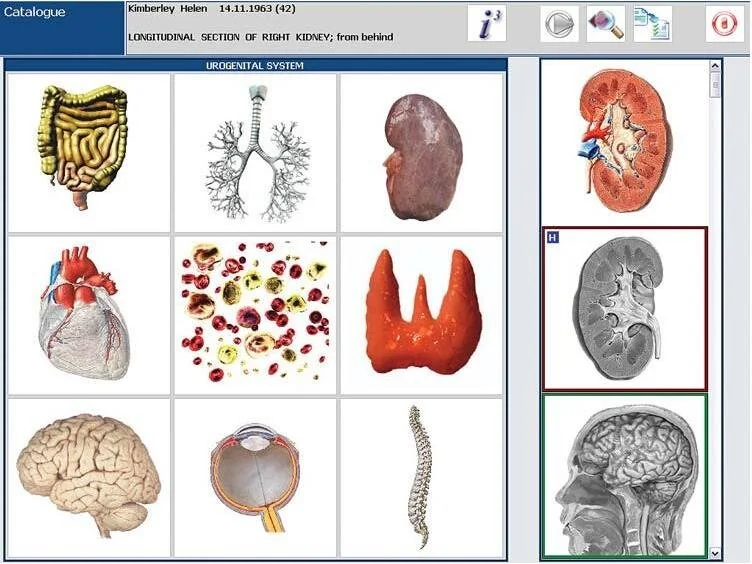
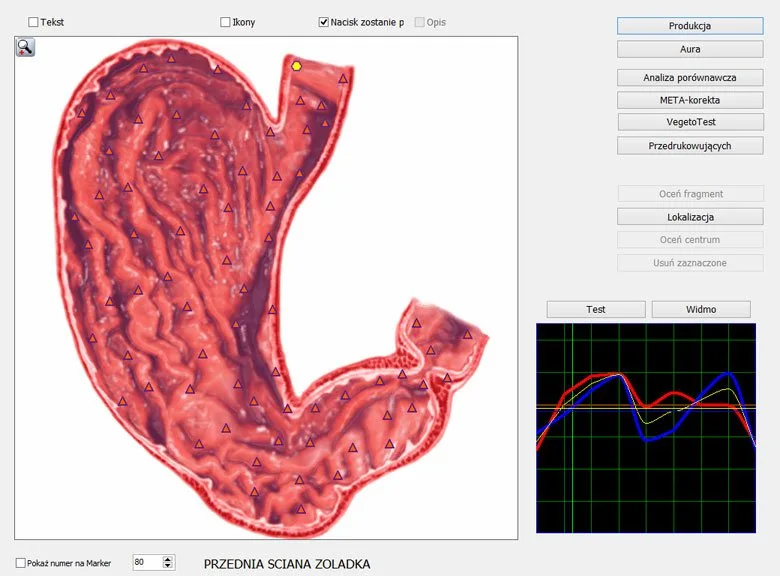
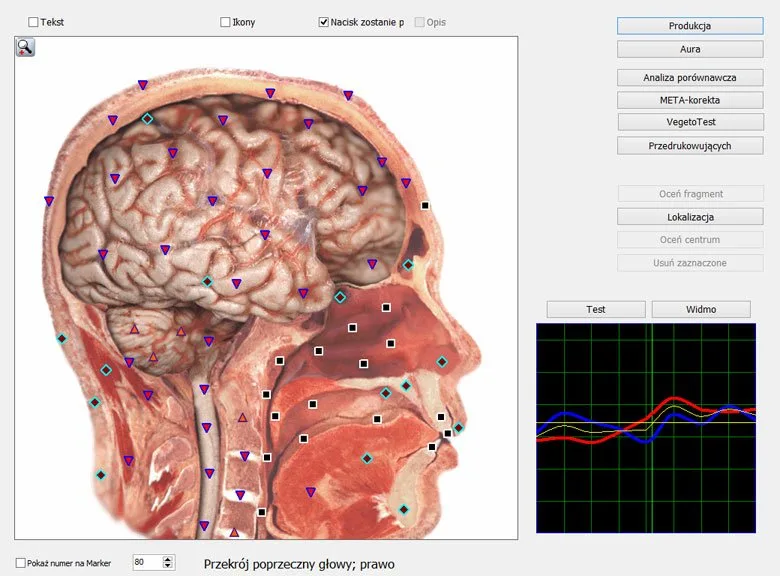
Hunter is the analytical software bundled with the Metatron Hunter 4025 class of NLS systems. According to the supplier information, the software performs an Auto 3‑D Spiral Scanning routine combined with what they describe as biological resonance scanning to create its analysis dataset. The vendor reports image-based output files and a report labeled an “Epicrisis” that summarizes the session findings into images and diagnostic categories you can use in client consultations. We reference the vendor material for these behaviors and outputs; the software name and report format are supplier-declared attributes (see product page and facts; data-prepared-source=”factory_product_facts:122″).
How the software maps scan data to readable reports
The workflow inside Hunter converts signal captures from the scanning routine into an internal index that matches entries in the software library (organs, pathomorphology, microorganisms, etc.). The vendor provides counts for the size of those libraries (for example, organs = 886; pathomorphology entries = 688), which explains why reports can list many possible items. Those lists are vendor mappings rather than clinical test identifications; treat them as a scanning‑library match rather than pathology confirmed by lab tests. (Vendor numbers and mapping descriptions: data-prepared-source=”factory_product_facts:122″.)
Key capabilities and limitations you must plan for
Capabilities — what Hunter offers
Auto 3‑D Spiral Scanning and biological resonance scanning modes reported by the vendor; described as fast scanning suitable for clinic throughput (data-prepared-source=”factory_product_facts:122″).
A relatively large internal library: the vendor lists 886 organs, 688 pathomorphology entries, and additional item libraries for microorganisms, homeopathics and nutraceuticals (see the registered counts below) (data-prepared-source=”factory_product_facts:122″).
Report outputs are delivered as images with an Epicrisis (visual report format) suitable for printing or storing in a client file (data-prepared-source=”factory_product_facts:122″).
Windows desktop compatibility with multiple versions stated by the supplier (Windows 7/8/10/11 and earlier variants — confirm exact installers for your configuration) (data-prepared-source=”factory_product_facts:122″).
Limitations and practical planning points
We must be clear about how to use these outputs safely in a U.S. practice:
Accuracy claims are vendor-declared. The supplier lists a 95%–98% “accuracy” range for the Hunter software; this is their stated figure and should not be taken as independent clinical validation (data-prepared-source=”factory_product_facts:122″).
Hunter’s results are algorithmic matches to a vendor library. These are not equivalent to laboratory or imaging diagnostics and cannot replace standard medical tests when a clinical diagnosis is required.
Regulatory and electrical installation details for the U.S. market are not supplied in the product snapshot we used. Verify local electrical, import and regulatory compliance (including device classification and advertising restrictions) before using Hunter in a clinical setting in the United States.
Report files are image-based; if you need structured numeric exports (CSV, XML) for an EHR or analytics pipeline, confirm export capabilities with the supplier prior to purchase.
Practical evidence drawn from supplier facts
We highlight the specific vendor-declared specifications that will affect how you explain results to clients and how you incorporate Hunter into workflow:
Which clinical and non‑clinical parameters Hunter registers
How NLS Analyzer Software (Hunter) Works — A Practical Guide for U.S. Alternative Wellness Practitioners · body
The supplier lists the software libraries that Hunter can reference during a scan. These are vendor library sizes and categories you will see represented in the output Epicrisis images and item lists:
These entries are the building blocks of the Epicrisis images. They help the practitioner frame follow-up questions and target further testing; they are not lab confirmations and should be communicated as screening-level output to clients.
How a typical session runs with Hunter software — clinic workflow
How NLS Analyzer Software (Hunter) Works — A Practical Guide for U.S. Alternative Wellness Practitioners · body
Below is a practical workflow we recommend when integrating Hunter into a U.S. wellness appointment. The steps are operational guidance based on the software’s reported behavior; they are not a clinical protocol.
Pre-visit preparation: Confirm the client has read and signed informed-consent documents that explain the nature of NLS scanning, the non-diagnostic status of results, and how you will store their data (see the PHI checklist section below).
Setup: Install the Hunter software on a dedicated Windows workstation confirmed to meet the supplier’s stated supported systems. Make sure the computer has a stable network and backup routine for report files.
Client intake: Record the client’s chief complaints and relevant medical history; note any medications and recent diagnostics so you can contextualize the Hunter outputs.
Scanning: Run the Auto 3‑D Spiral scanning per the software interface. The vendor indicates scanning is fast; follow the on‑screen prompts and ensure the client remains still during acquisition.
Review: Examine the Epicrisis images and the itemized lists for organs, pathomorphology and other libraries. Use them as conversation prompts — for example, to identify areas where you will recommend further testing or targeted wellness interventions.
Documentation: Save the Epicrisis images into the client record, export any supported file formats, and document your interpretation, recommended follow-ups and any referrals.
Follow-up: Use the software outputs to structure a care or monitoring plan, but base clinical decisions on validated tests and interdisciplinary consultation when pathology or medical diagnosis is suspected.
Data, file and report format: how you will receive and store outputs
The supplier specifies that reports are “Images with Epicrisis” (data-prepared-source=”factory_product_facts:122″). That means you will primarily receive visual report files rather than structured data tables unless you confirm additional export options with the vendor. Consider these practical steps:
Confirm the report file format (JPEG, PNG, PDF) and whether the software can batch-export session files for backup and EHR upload.
If your practice requires structured data for analytics, request a demonstration of export capabilities or an API from the supplier before purchase.
Store image reports in your client EHR with standard naming conventions and version control; maintain encrypted backups given the PHI nature of the files.
Software environment and system compatibility you must confirm
The product record lists supported Windows versions (Windows 7/8/10/11 and variants). Even when published compatibility looks broad, follow these checks:
Ask the supplier for the exact installer package compatible with your Windows build (32-bit vs 64-bit) and any required drivers for the scanning hardware.
Confirm whether the software requires local admin privileges, specific.NET frameworks, USB drivers, or firewall exceptions to operate.
Verify licensing and activation models (single-seat license, dongle, or cloud activation) so you can plan desktop provisioning and remote access policies.
How Hunter changes your intake and documentation process (U.S. practitioner checklist)
Using NLS software in the United States has operational and compliance implications. Below is a pragmatic checklist you can use to update intake procedures:
Informed consent form specific to NLS scanning that states the vendor classification of results as screening-level and not a medical diagnosis.
PHI handling policy covering where Epicrisis images are stored, who can access them, and how long you retain them. If you maintain an EHR or cloud backups, ensure encryption and access logging.
Documentation template that records the scan date, operator, scanner ID, software version (record the Hunter software version), a short interpretation and any referrals or recommended medical tests.
Referral protocol: predefine criteria that trigger referral to a licensed medical professional (e.g., findings suggesting suspected serious pathology or signs inconsistent with the client’s known history).
Disclosure language for marketing and client communications: avoid presenting Hunter outputs as definitive medical diagnoses and include the appropriate cautionary statement in written materials.
Risks and regulatory considerations you must discuss with clients
There are three practical risk areas to manage:
Interpretation risk — because Hunter reports are algorithmic matches to a vendor library, misinterpreting output as a medical diagnosis can lead to delayed care or inappropriate self-treatment. Always document that results are screening-level.
Regulatory risk — device classification and permissible claims vary by jurisdiction. The supplier lists ISO 9001 and CE as declared certifications in their company description, but CE is an EU conformity marking and ISO 9001 is a quality-management standard; neither alone establishes U.S. FDA medical-device clearance. Verify marketing claims and device classification for the U.S. market before clinical use.
Data risk — Epicrisis images are PHI. Ensure secure storage, provider access controls and appropriate client consent for collection and retention.
When NLS software adds value — realistic use cases and what it will not replace
Where Hunter commonly adds value:
As a screening and educational tool in wellness, integrative and complementary care settings to highlight areas for discussion and lifestyle prioritization.
For longitudinal wellness monitoring: tracking changes in repeated scans to document perceived client progress in a non‑medical context.
As a triage aid within a broader assessment framework, prompting targeted lab testing or medical referral when indicated.
What it will not replace:
Validated medical diagnostics (blood work, imaging, histopathology) for diagnostic confirmation.
Licensed medical interpretation required under U.S. standards when a diagnosis or treatment decision is medical in nature.
Common practitioner questions and what to ask your supplier
When you contact the vendor or a reseller, these are the practical questions that matter to clinic operations:
Can you provide a live software demo using the exact software version I will receive (Hunter, softwareVersion 2026)?
What file formats does Epicrisis export to (PDF, PNG, JPG)? Is structured data export available (CSV/XML)?
Which Windows builds and 32/64-bit variants are supported by the supplied installer? Are drivers and installers provided for enterprise deployment?
What licensing mechanism is used (single license, network license, dongle)? Are updates included or charged separately?
Can you provide written confirmation of declared certifications and clarify whether any U.S. regulatory approvals or registered listings apply?
What training is supplied for operator use, report interpretation basics and routine maintenance?
Warranty and service details: what does the 1-year warranty cover and what are typical service/parts lead times after warranty?
Comparing Hunter to other NLS labels — practical selection criteria
When you evaluate Hunter against other NLS packages, focus on operational fit rather than marketing claims. The table below highlights vendor-declared, directly comparable fields between two models in the supplier’s product family so you can see how counts and declared features differ.
Selection criteria that matter most for clinics:
Demonstrated export formats you require for records and billing.
Exact operating-system and driver compatibility with your current hardware.
Training and documentation quality — does the supplier provide clinically focused guidance on interpreting outputs?
Commercial terms: MOQ, lead time, warranty and availability of replacement hardware or spare parts in your region.
Practical evidence gaps and items to verify before purchase
Our review of the supplier materials surfaces useful vendor-declared facts, but also two practical gaps you must resolve before you rely on Hunter in a U.S. clinic:
Regulatory status for the United States — the supplier lists CE and ISO 9001 in their company profile, but the product record does not provide U.S. regulatory clearances or device classifications. If you will present results to clients as part of clinical decision-making, confirm whether any U.S. registration or applicable disclaimers are required.
Electrical/installation and technical support coverage for the U.S. market — the product snapshot does not include explicit U.S. electrical specifications or local installation support; confirm power requirements, shipping/import paperwork and available local service channels before purchase.
Practical checklist before you buy or trial Hunter
Request a live demo using the exact Hunter software version and your intended Windows build.
Obtain a sample Epicrisis file and installer to test in your EHR and record-keeping workflow.
Confirm export formats, license model, and update policy in writing.
Ask for written documentation of declared certifications and any export/import paperwork for the U.S.
Make a plan for staff training, consent forms and a referral policy that integrates Hunter outputs safely into care delivery.
When to choose Hunter and when to choose another option
Choose Hunter when you want a vendor-supported NLS system with a large vendor library, image-centric reporting and the convenience of rapid scan runs integrated into a client education workflow. Choose an alternative when you require laboratory-equivalent results, structured data exports out-of-the-box, or when you need a device with explicit and documented U.S. regulatory clearance for diagnostic claims.
FAQ — short practical answers to common follow-ups
Can Hunter replace laboratory testing?
No. Hunter provides algorithmic, library‑matched screening outputs and images (Epicrisis). Use its reports to guide further diagnostics and wellness planning; rely on validated laboratory or imaging tests when clinical confirmation is required.
Is Hunter HIPAA‑ready?
The vendor snapshot does not state HIPAA compliance. You are responsible for implementing secure storage, access controls and consent processes that meet HIPAA if your practice is subject to those rules. Ask the supplier about data export, encryption and hosting options relevant to PHI handling.
Does the supplier provide training?
The product record mentions standard commercial details (MOQ, warranty, lead time) but does not list training specifics. Request training scope, format (onsite/online), and pricing as part of your pre-purchase questions.
One useful next step — request a tailored configuration or quotation
We welcome inquiries from practitioners interested in local distribution or dealership opportunities in the United States. Please include “U.S. distributor inquiry” in your email subject and outline your organization, intended territories and projected volumes.
本文仅供一般信息参考,不能替代医生诊断或治疗,也不作为医疗诊断依据。 (This article is for general informational purposes only and does not substitute for professional medical diagnosis or treatment.)
This content is provided for learning, information sharing and professional communication only. It is not medical advice and is not a basis for treatment or diagnosis. Confirm suitability, operation and purchasing requirements against the product manual, local regulations and qualified professional guidance.
If you want a demonstration, a configuration that fits a U.S. wellness clinic, or a quotation, email our sales specialist with the following details: intended application (wellness screening, spa, clinical adjunct), destination market (United States), desired modules or libraries (if known), and the quantity you plan to order. Email: Lucy@ihunter4025.com. You may also contact us by WhatsApp at +86 13510907401 or visit our site: ihunter4025.com.
Related resources
Metatron hunter 4025 nls analyzer MK-018: specifications for professional buyers