What the Hunter 4025 NLS Health Analyzer is (plain-language definition)
We describe the Hunter 4025 NLS Health Analyzer as a factory-supplied system that pairs specialized scanning software with a reference etalon library to produce visual screening reports. The product is positioned for health and wellness applications: screening, client intake support, and producing output that practitioners can use to plan follow-up assessments or wellness programs. The system relies on an algorithmic matching process (the vendor terms this “Hunter” software) and delivers results as images accompanied by an epicrisis-style summary report. This is a technology for non-invasive informational screening, not a certified medical diagnostic instrument in U.S. clinical practice unless you have confirmed local regulatory clearance.
What the device actually measures and the outputs you will see in a session (practical evidence)
Sessions with the Hunter 4025 produce a structured set of outputs rather than direct laboratory numbers like blood panels. Expect:
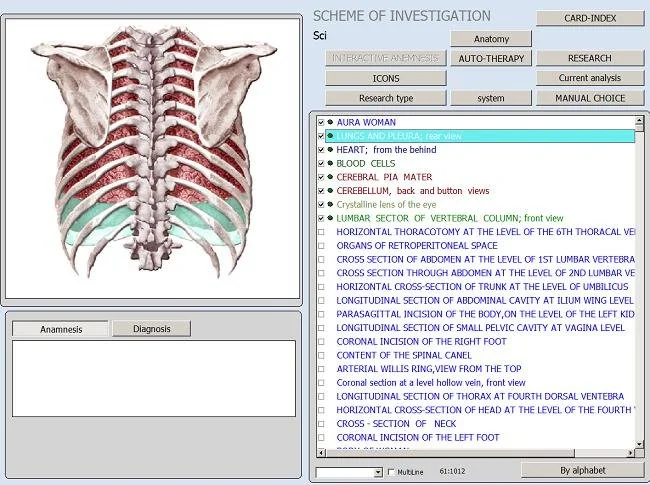
Visual organ scans and spectrogram-style images grouped by organ systems;
Comparative matches to a library of condition markers (etalon list) across categories such as pathomorphology, microorganisms and helminths, allergens, allopathy/homeopathy items and nutraceuticals;
Reported indices for meridian analysis and food/emotional analyses where supported by the software;
An “Images with Epicrisis” formatted report summarizing findings and suggested reference items from the etalon database.
Those outputs are intended to support practitioner conversations and triage within a wellness workflow. They are not direct clinical lab results and should be interpreted alongside clinical assessment and, where appropriate, conventional medical tests.
Verified technical snapshot buyers must know (company-supplied specifications)
Below is a compact technical snapshot using the vendor’s supplied values. These are company-provided specifications; review the product manual and ask for details specific to your installation.
We used the vendor’s library and software descriptors to compile this table. If your center plans to rely on specific etalon lists or a language pack, ask for a sample report that shows the exact fields and wording.
Realistic clinic uses: intake, monitoring and client communication workflows
Wellness centers typically use the Hunter 4025 in three practical workflows:
Initial screening during intake — Run a baseline scan to gather a broad snapshot across organ systems, allergens and nutritional susceptibilities. Use the Images with Epicrisis report to guide the first practitioner conversation. Emphasize that this is a screening tool and recommend confirmatory tests when conventional medical concerns arise.
Monitoring and follow-up — Repeat scans at scheduled intervals to document changes in the system output. Many centers pair the visual report with progress notes: subjective symptom changes, lifestyle interventions, and any lab results ordered by a clinician.
Client education and product selection — The etalon library lists nutraceuticals, homeopathic remedies and suggested allopathy/homeopathy items. We recommend using those lists as discussion aids rather than prescriptive treatment plans; any product recommendations should respect scope of practice rules in your state and facility policies.
In practice, clinics that integrate this device successfully create a clear script for what the scan is and is not. For example: “This scan provides information that may help prioritize further evaluation; it is not a medical diagnosis.” Training front-desk staff to manage expectations prevents misunderstandings before sessions begin.
What Hunter 4025 can and cannot be used for in a U.S. wellness center (practical and regulatory-minded limits)
What it can be used for:
Non-invasive screening to highlight potential areas for further assessment;
Visual reports for client education and wellness planning;
Complementary monitoring inside wellness programs where staff clearly document that findings are informational;
Reference library access for educational and lifestyle-support suggestions.
What it cannot be used for (and important cautions):
Do not interpret the outputs as definitive medical diagnoses. The vendor’s stated “95%–98% accuracy” refers to the software’s internal algorithmic matching and should not be presented as clinical diagnostic accuracy for specific diseases;
We do not have company-supplied evidence of FDA clearance for this model. If you plan to use results to inform medical decisions—for example in lieu of standard diagnostics—consult legal counsel and a licensed clinician about compliance and patient-safety obligations;
Avoid advertising the device as a medical diagnostic device unless you hold the appropriate regulatory approvals for such claims in the U.S.; marketing language should be limited to “screening” and “informational reports” unless you have documented approval.
Integration and setup: software, supported operating systems, hardware and staffing steps
Software and OS: The Hunter software that ships with this model supports Windows 7, Windows 8, Windows 10 and Windows 11 (company-supplied). Confirm whether you require 32‑bit or 64‑bit builds for your workstation before installation.
Hardware and IT checklist (practical items to resolve before purchase):
Reserve a dedicated Windows workstation or laptop that meets the Hunter software minimums. Ask the distributor for a recommended specification sheet;
Confirm interface and connector requirements with the supplier—our provided materials do not include country-specific electrical or connector details, so request the manual or installation sheet for U.S. power and cabling specifics;
Plan for backups and secure storage of client reports to meet HIPAA or state privacy rules if you will store personal health information. The device’s software outputs files that should be treated like other client records;
Assign a staff member (or contractor) to complete vendor-provided training and to act as the system administrator; expect an initial learning curve for scanning, interpreting the etalon lists, and exporting reports;
Decide report delivery method in advance (printed handout, emailed PDF, or portal upload) and test the workflow in a mock session before using on clients.
Staffing: Train at least one clinician-level user to interpret reports and a front-desk user for session administration. We recommend written protocols for triage triggers—i.e., which scan results prompt referral to a licensed medical clinician.
How to evaluate accuracy and report format in practice (what the 95%–98% accuracy and “Images with Epicrisis” mean for you)
When the vendor states “95%–98% accuracy,” they are describing the software’s matching confidence between scanned signatures and etalon entries. That metric is internal to the software and usually reflects algorithmic matching performance, not clinical validation against gold-standard tests. Treat the figure as an internal performance indicator to be validated against clinical judgment in your own practice.
Practical steps to evaluate accuracy in your clinic:
Run parallel checks on a small number of clients who are already receiving conventional diagnostics (with consent). Compare the device’s flagged areas against available clinical tests to get a practical sense of its alignment in your client population;
Request sample reports from the supplier that include the “Images with Epicrisis” format so you can verify layout, readability, and the specific etalon labels used. Ask for a native PDF sample to confirm your practice’s documentation standards;
Define internal thresholds for action. For example, if the device flags a specific organ class above a vendor-supplied threshold, define whether that triggers a referral, a lifestyle intervention, or repeat scanning;
Document discordant cases and review them periodically. That record will inform how you communicate the tool’s limits to clients and refine your triage protocols.
Report format: “Images with Epicrisis” means the primary deliverable pairs visual scan images with a short narrative summary of findings. Verify the language and terminology used in the epicrisis report before you commit to using reports as client handouts, especially if you plan to translate or localize them for non-English speakers.
Selection checklist: eight practical questions to resolve before you request a quote
What exact service will you offer with the device (screening only, monitoring, or product-selection support)? Define scope first.
Do you need documented regulatory advice or legal clearance to use a screening device in your state? If in doubt, consult a health-law attorney.
What is your IT readiness? Confirm a dedicated Windows workstation meets the Hunter software requirements.
Which etalon libraries and language packs do you require? Ask for sample output in English and any other languages you need.
What training options are included or available for staff and how long is the learning curve expected to be?
What are warranty terms and spare-parts availability locally? Confirm lead times for replacement parts.
How will you protect client data (HIPAA compliance, report storage, and access control)?
Do you want distribution rights or a reseller arrangement in the U.S.? If yes, prepare a brief business plan to discuss margins and localization needs with the supplier.
How to request a quote or distributor partnership (what to include in your inquiry)
When you email for a quote or distributor discussion, include the following items to speed a useful reply:
Your business name and facility type (wellness center, clinic, spa);
Intended use cases (intake screening, monitoring, product‑selection support, education);
Number of units you want initially and whether you need demo units or training on site;
Preferred software language and operating system environment (Windows 10/11 64‑bit, etc.);
Whether you require distributor/reseller terms and localized support (shipping, import assistance, after‑sales);
Bill‑to and ship‑to country and any customs or import notes relevant to your location in the U.S.;
Contact person, phone/WhatsApp number and best times to call for a follow-up.
Send inquiries to Lucy@ihunter4025.com or WhatsApp +8613510907401. Pricing is available on inquiry; ask for a formal quotation that shows configuration options, warranty coverage and training costs. If you are considering a distributor relationship, indicate that in the subject line and attach a brief company profile.
Short FAQ addressing common buyer follow-ups
Is the Hunter 4025 FDA-cleared for diagnostic use in the U.S.?
We have no company-supplied evidence of FDA clearance for this model. Using the device to inform clinical diagnoses may require regulatory review; consult legal counsel and a licensed clinician before positioning it as a diagnostic tool in U.S. practice.
What training is required to use the system?
The supplier provides Hunter software and the etalon library. We recommend training at minimum for one clinician-level operator and one administrative operator. Request details on vendor training packages when you ask for a quote.
Can the software run on my existing Windows machine?
The vendor lists support for Windows 7, 8, 10 and 11. Confirm whether your machine is 32‑bit or 64‑bit and ask for a recommended spec sheet. For clinical use, a dedicated, well-maintained workstation is best.
What do you mean by “Images with Epicrisis”?
It is the report format supplied by the vendor pairing scanned images and a summary (epicrisis) of findings. Request a sample report to verify the exact layout and the language used before introducing it to clients.
What are typical lead times and warranty?
Company-supplied lead time is 2–5 days and warranty is one year. Ask for a written purchase agreement that clarifies shipping, import duties and after-sales support for your region.
Evidence limitations and practical risks you should manage
We rely on company-provided specifications and library descriptions for the statements above. Important limitations and risks:
The reported “95%–98% accuracy” is an internal software metric and is not the same as clinical validation against accepted medical tests. Treat it as vendor performance data, not clinical proof;
We do not have supplier-provided U.S.-specific electrical installation details in the materials we reviewed. Confirm power, connector and installation needs for U.S. facilities with the supplier before purchase;
Regulatory status in the U.S. is not provided by the vendor materials. If your center intends to use device outputs for medical decisions, engage regulatory counsel and your clinical director;
Data privacy: the software generates client reports; ensure your storage and transmission practices meet HIPAA or applicable state privacy requirements.
Next step: how to request a quote or a U.S. distributor discussion
If your goal is to become our local distributor in the U.S., include a short business profile, expected initial order quantity, and proposed territory in your first message. We welcome qualified partners and will discuss margins, localization, support commitments and training during a first call.
Localized disclaimer
This article is for general information only. It cannot replace a licensed clinician’s diagnosis or treatment, and it should not be used as the sole basis for medical decisions.
Short closing note from our team
We aim to be transparent about what the Hunter 4025 supplies to a wellness practice: a rich etalon library, imaging reports (Images with Epicrisis), and Windows‑based Hunter software. These outputs can support intake, client education and monitoring when used with documented protocols and appropriate clinical oversight. For a sample report, formal quote or discussions about U.S. distribution, contact Lucy@ihunter4025.com or WhatsApp +8613510907401.
This content is provided for learning, information sharing and professional communication only. It is not medical advice and is not a basis for treatment or diagnosis. Confirm suitability, operation and purchasing requirements against the product manual, local regulations and qualified professional guidance.
If you want a quote, a sample report, or to discuss distributor terms for the United States, contact us exactly as follows. Provide the checklist items above and we will respond with configurations, confirmed lead time for your shipment destination, and training options.