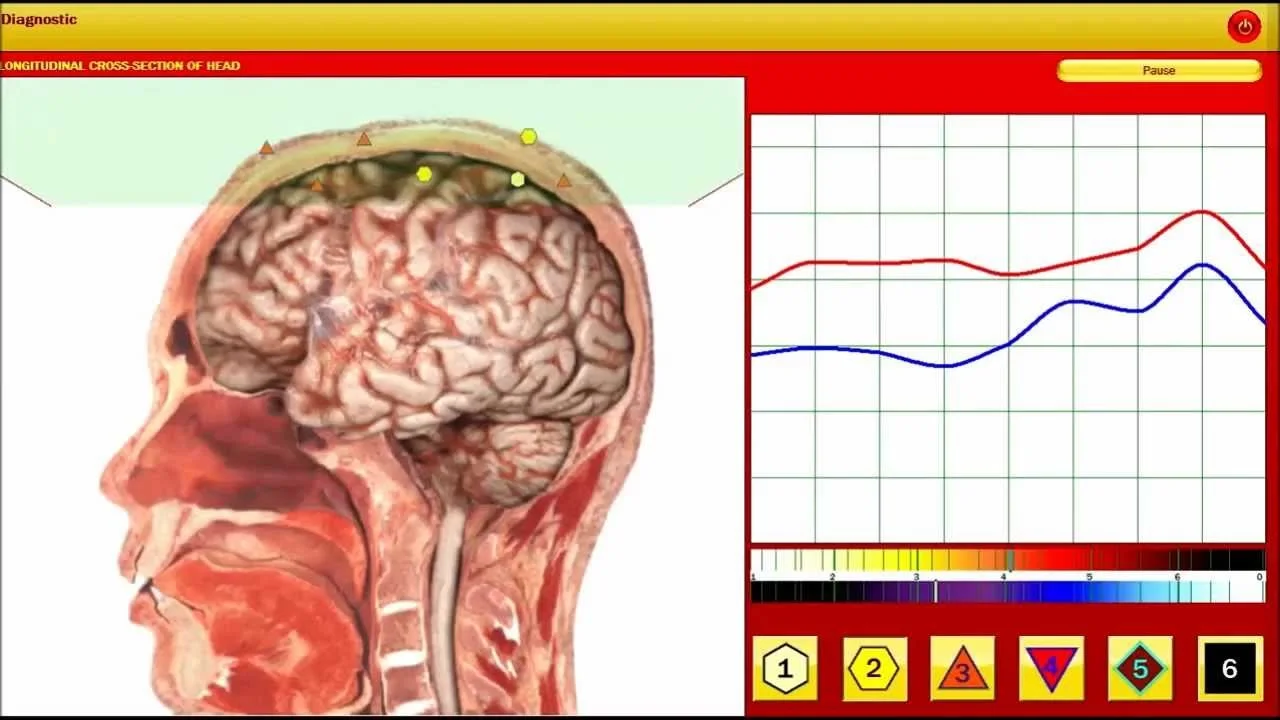
If you need one clear system to evaluate now, consider the Metatron Hunter 4025 as your first evaluation unit. It combines Auto 3‑D Spiral Scanning and biological resonance scanning, a large etalon library (886 organs, 688 pathomorphologies and broad therapeutic libraries), Hunter 2026 software, Windows compatibility and single‑unit MOQ—features that map directly to the common workflow needs of small to mid‑sized U.S. wellness and integrative clinics. Use the 4025 as a clinic’s diagnostic intake screen, not as a stand‑alone medical diagnosis; request a live demo and a quote that shows the exact software/report configuration you will receive before purchase.
Contents
Direct answer — which NLS system to consider right now
For a U.S. wellness or integrative clinic deciding today, we recommend prioritizing the Metatron Hunter 4025 (model name Metatron hunter 4025 nls analyzer) as the system to evaluate first. The 4025 is positioned as a full‑feature NLS device with the Hunter 2026 software and a large built‑in etalon library that addresses organ screens, pathomorphologies and therapeutic databases you will actually use in intake sessions. It’s a practical trade‑off between a broad feature set and the operational realities of a small clinical practice: Windows‑based software, single‑unit MOQ, quick lead times and standard one‑year warranty. See our evidence discussion and realistic limitations sections below before you commit; this unit should be treated as a screening and client‑engagement tool rather than a substitute for clinical testing or licensed medical diagnostics.
Who this answer is for
This article is written for a single reader type: a Wellness Center Owner or Integrative Clinic Operator in the United States who needs a defensible, clinic‑focused recommendation about a non‑linear system (NLS) for routine client intake, screening and integrative planning. You are looking for a device that fits a small or mid‑sized clinic workflow, integrates with your records and reporting, and gives staff usable outputs during the first client visit.
Primary clinic goals an NLS system must solve
We judge any NLS purchase against three practical clinic problems—not vendor marketing lines:
Faster, consistent intake screening: produce repeatable scans and clear visuals that let a practitioner prioritise follow‑up testing or referrals during the same visit.
Actionable reporting that supports integrative plans: reports must include identifiable organ or system flags, therapeutic reference libraries and exportable images or summaries for the client file.
Operational fit: the device must run on clinic IT (Windows variants), require manageable training, and have supplier support, a defined warranty and realistic lead times for replacement parts or software updates.
If the system cannot satisfy those three practical goals, it becomes a marketing gadget rather than a clinic tool.
Key technical features that matter to a U.S. clinic — what to check and why
When we evaluate NLS hardware and software for clinic use we focus on features that materially affect daily use and risk management:
Scanning method and speed — Determines exam throughput and repeatability. Auto 3‑D spiral scanning and biological resonance scanning (a hybrid scanning approach) lowers technician variance and shortens session times.
Library scope and etalon counts — The number of organs, pathomorphologies and therapeutic items in the etalon library affects how often the software will suggest clinically relevant matches you can act on. Larger, well‑classified libraries improve hit rates for exploratory screening.
Report format and exportability — Clinics need printable client reports and electronic export (images, PDFs, “epicrisis” summary pages) to file in client records and send to other practitioners.
Software platform and versions — Compatibility with Windows 11/10/8/7 matters. Confirm the supported OS list and whether your clinic workstation needs upgrades.
Meridian, Food and Emotional modules — These are practical add‑ons for integrative protocols. If you and your team use meridian mapping or nutraceutical planning, ensure the system has those modules.
Supplier support, training and warranty — Ask for documented training hours, support SLA, and warranty terms. One‑year hardware warranty is common; confirm what the warranty covers.
Regulatory and clinic compliance — The device must fit your documentation and informed‑consent workflow; avoid systems that make explicit clinical diagnostic claims without supporting local approvals.
How Metatron Hunter 4025 addresses the top clinic needs — practical feature summary
The Metatron Hunter 4025 ships with Hunter software (2026) and a set of practical, clinic‑oriented features that match the requirements above: Auto 3‑D Spiral Scanning and biological resonance scanning as the core scanning method; a large etalon library including 886 organs, 688 pathomorphologies, broad libraries for homeopathy (1,498 entries) and nutraceuticals; meridian analysis; food and emotional analysis; and reporting expressed as images with an epicrisis summary. The manufacturer lists Windows compatibility (Windows 11, Windows 10, Windows 8, Windows 7) and a one‑year warranty. The device is offered with MOQ = 1pcs and short lead time (2–5 days) which simplifies procurement for single clinics.
Why that matters for your clinic:
Auto 3‑D Spiral Scanning reduces technician variability on entry scans, which helps produce consistent intake outputs between operators.
The etalon counts (organ/pathomorphology/homeopathy/therapeutic libraries) provide a broader set of matchable items you can reference directly in consults and in client handouts.
Report output as image + epicrisis makes it straightforward to attach a visual summary to an EHR or paper chart and to use as a client takeaway.
Windows support avoids new OS investments for most clinics; confirm the target workstation meets the vendor’s recommended hardware spec.
Limitations and realistic outputs: what an NLS system can and cannot give you in a client session
We will be explicit: an NLS system is a screening and biofeedback tool, not a certified diagnostic laboratory instrument. Expect outputs that are suggestive rather than definitive. Typical achievable outputs include:
Visual organ and system flags from the etalon library to focus further testing or clinical questioning.
Suggested homeopathic/allopathic/nutraceutical matches drawn from internal libraries for practitioner review.
Meridian and food‑sensitivity style summaries useful for integrative planning.
What the 4025 does not provide (as stated by the vendor and standard practice):
It does not replace lab tests, imaging or licensed clinical diagnostics; it provides correlated patterns from a reference library.
The system’s declared accuracy range (vendor stated) should not be interpreted as equivalent to clinical diagnostic sensitivity/specificity without independent studies. The vendor lists an accuracy figure for the product; clinics should treat that as vendor‑reported and request supporting documentation if they plan to rely on it clinically.
The device is dependent on software etalon quality and on operator training — results vary with library versions and user practice.
Operational risks to manage:
Over‑reliance risk: using NLS outputs to substitute for ordered lab work exposes your clinic to clinical and regulatory risk.
Record‑keeping and informed consent: you should document how a scan is used in care planning and ensure clients understand the screening nature of results.
Software updates and compatibility: confirm update pathways and whether report formats change with updates; otherwise, older client reports may not open in new versions.
Quick comparisons to help decide (feature‑focused)
Below is a compact feature comparison between the Metatron Hunter 4025 and a closely related unit in our product family, the Metatron 4021. Use this table to spot operational differences that matter for clinic workflows.
Feature
Metatron Hunter 4025
Metatron 4021
Software
Hunter (2026)
4021 NLS (2026)
Scanning method
Auto 3‑D Spiral + Biological resonance scanning
Iris‑NLS biofeedback scanning (product page)
Number of organs (etalon)
886
(vendor page lists broad use scope; confirm counts in quote)
Meridian analysis
Yes
Vendor states meridian tables included (confirm in quote)
Chakra analysis
No
(check product page)
Report format
Images with Epicrisis
Vendor page indicates imaging and summary outputs
Supported OS
Windows 11, 10, 8, 7
Windows 11, 10, 8, XP (confirm)
Warranty
1 year
1 year
Interpretation: the 4025 emphasizes Hunter software, spiral scanning and a larger stated etalon set; the 4021 is presented as a similar Iris‑NLS option with overlapping use cases. The practical decision point for a clinic is library composition, report formats, and whether the meridian/food/emotional modules are required by your protocols.
Operational checklist for the first 90 days after purchase
To get a new Metatron Hunter 4025 integrated smoothly, follow this practical checklist that reflects common clinic realities.
Before arrival
Confirm the exact software version and whether the delivered machine will have English language and the Hunter 2026 software preinstalled.
Assign a clinic workstation that meets the vendor’s recommended hardware; test Windows compatibility in advance.
Prepare a patient‑education handout explaining the scan is a screening tool (we can supply a template upon request).
Days 1–14: Setup and staff training
Unpack and verify hardware against the packing list; check serial numbers and that Hunter software opens.
Run the vendor’s initial calibration routine and one supervised training session for the primary operator and one backup staff member.
Create an intake workflow script incorporating the scan: where it sits in the appointment (pre‑visit, at intake, or post‑consult), who explains results, and how the report attaches to the client record.
Days 15–60: Pilot with real clients
Run 20–30 supervised client scans. Use these to tune the intake script and timing. Document average session duration and staff time per client.
Collect feedback from practitioners on report clarity and whether the etalon suggestions are clinically useful. Keep copies of 10 sample reports for vendor review.
Set a defined policy for when NLS findings trigger further lab work or referrals. Place this policy in the client chart template.
Days 60–90: Operationalize and evaluate
Review pilot metrics: average scan time, number of times NLS changed the appointment flow, patient satisfaction with the scan summary.
Decide whether to purchase additional training modules or custom report templates based on clinician feedback.
Schedule quarterly vendor updates and confirm software update policy and support contact points.
Integration and software compatibility to check before buying
Confirm these items with the supplier before you sign a purchase agreement:
Exact supported OS and minimum hardware — The 4025 vendor lists Windows 11, Windows 10, Windows 8, Windows 7 support; confirm 64‑bit vs 32‑bit requirements for your clinic PC. (data-fact-id=”122″)
Report export formats — Ask whether the system exports PDFs, standard image files and whether the epicrisis summary is machine‑readable or only image‑based. The vendor lists “Images with Epicrisis” as the report format; confirm electronic export options. (data-fact-id=”122″)
Language support and templates — If you need multi‑language client reports or customized report headers, confirm whether custom templates are available or if the vendor will provide them as a paid service.
Network and security — Confirm how local storage vs cloud backup is handled and whether the software supports encrypted client folders in your EHR environment.
Questions to ask suppliers and what answers you need to resolve before signing (three non‑negotiables)
Can you demonstrate the exact software and report I will receive?
We need a live demo using the exact Hunter 2026 build and the report template you will ship. If the supplied demo is a different version or language, do not accept it as representative.
What does the one‑year warranty cover and what are out‑of‑warranty costs?
We need the warranty in writing: parts covered, software update policy, and a price list for common spare parts and remote support. Confirm whether shipping and duties for returns are included.
What training and ongoing support are included, and how is it delivered to a U.S. clinic?
Require a documented training plan (hours, materials), remote vs on‑site options and support contact details for U.S. operations. If localization or custom templates are needed, get a written quote for that work.
How to evaluate supplier support, training and warranty for U.S. operations
Support quality is the single biggest variable after the machine itself. For U.S. clinics, look for:
Clear support channels (email and a reachable phone/WhatsApp). We provide Lucy@ihunter4025.com and WhatsApp +8613510907401 for quotes and support requests; ask for local escalation contacts.
Documented training that includes both operator procedures and your clinic’s intake script. Training should include at least two live sessions with your staff and recorded material you can reuse for onboarding.
Transparent spare‑parts pricing and a published turnaround time for replacement components. A one‑year warranty is typical; verify what “one year” excludes (software licensing, consumables, accidental damage).
Availability of software updates and whether updates require paid re‑license or are included for a defined period.
How to prepare a short on‑site demo or proof‑of‑concept (POC) so you can compare systems reliably
Arrange the same basic POC for each supplier you test. Use this checklist to compare objectively:
Ask suppliers to run the same three client profiles through their system (e.g., adult with chronic GI complaints, middle‑aged client with musculoskeletal pain, and a wellness check client). Record time from setup to final report for each profile.
Request that the vendor produce at least two exported report formats (PDF and image), and a sample epicrisis page to verify it integrates into your client record.
Make the demo include a short training moment: have your primary operator run the second session after the vendor runs the first. Note usability and consistency.
Collect written documentation during the POC: operator manual excerpt, calibration instructions and software change log.
Rate each system on four clinic‑critical axes: setup time, operator learning curve, report clarity and vendor responsiveness. Use identical scoring so you can compare across vendors.
How Metatron Hunter 4025 stacks up for U.S. clinics — final practical judgement
The Metatron Hunter 4025 matches the pragmatic needs we observe in U.S. wellness clinics: spiral scanning for consistent throughput, a large etalon set for wide coverage, Hunter 2026 software for current library management, and Windows compatibility. The vendor lists a one‑year warranty, a single‑unit MOQ and short lead times, which lowers procurement friction for clinics that want to pilot before wider rollout. Treat it as a clinic screening and engagement instrument; do not treat vendor accuracy percentages or library matches as standalone medical proof. If your practice prioritizes client engagement, visual reports and an extensive therapeutic library for integrative planning, the 4025 should be on your short list for a POC.
One‑page configuration request to send suppliers
Copy and paste this when you request a formal quote so the supplier responds with the exact items you need:
Clinic name:
Location: United States (city, state)
Intended use: intake screening, client handouts, integration with clinic EHR
Requested model: Metatron Hunter 4025 (Hunter 2026)
Software & language: Confirm Hunter 2026 English UI and English report templates
Report formats required: PDF and high‑resolution image export; epicrisis page as separate PDF
Supported OS confirmation: Windows 11 / Windows 10 (64‑bit)
Warranty & support: 1 year standard warranty (please list exclusions) + remote support hours included
Training: Number of live training hours and post‑installation recorded materials
Lead time & shipping: Unit cost, shipping to (city, state), estimated lead time
Accessories and spare parts: list and price
Total quote requested with itemized shipping and taxes
Contact: [Your name, phone, email]
Supplier contact and next step
If you want a tailored configuration or a demo appointment for the Metatron Hunter 4025, contact our U.S. inquiry point with the configuration request above. We will reply with a formal quote and schedule a live demo using the exact Hunter 2026 build and report template you will receive.
Contact: Lucy@ihunter4025.com or WhatsApp +8613510907401. Visit our product page for technical illustrations: Metatron Hunter 4025 product page.
FAQ (brief)
Can the 4025 replace laboratory tests?
No. The 4025 is a screening and biofeedback system that produces suggestive patterns and reference matches from its etalon libraries; it does not replace clinical laboratory testing or regulated diagnostic procedures.
Does the 4025 work on current Windows PCs?
The vendor lists support for Windows 11, 10, 8 and 7. Confirm hardware requirements and whether a 64‑bit OS is required for your configuration. (data-fact-id=”122″)
What is included in the one‑year warranty?
The standard vendor warranty is one year. Ask the supplier for written warranty terms that list covered parts, software licensing provisions, and exclusions before purchase. (data-fact-id=”122″)
Evidence and limitations
We used the product details supplied for the Metatron Hunter 4025 and Metatron 4021 to compose this recommendation. When we quoted specific feature values—such as scanning method, etalon counts, software name, supported OS and warranty—we preserved the exact vendor‑reported values. Those values are vendor statements and should be verified during your vendor demo and in the formal quote.
If you need additional independent validation (for example, peer‑reviewed clinical studies or U.S. regulatory status), request those documents from the supplier and consult an appropriate licensed professional before incorporating NLS outputs into clinical decision‑making.
Useful next step
To get a tailored quote and schedule a live demo using the exact Hunter 2026 software and the report template you will receive, email Lucy@ihunter4025.com or message WhatsApp +8613510907401. Provide the one‑page configuration request above and your preferred demo dates.
This article is for general information and clinic planning only; it cannot replace a physician’s diagnosis or medical treatment and should not be used as a sole basis for clinical decisions.
This content is provided for learning, information sharing and professional communication only. It is not medical advice and is not a basis for treatment or diagnosis. Confirm suitability, operation and purchasing requirements against the product manual, local regulations and qualified professional guidance.