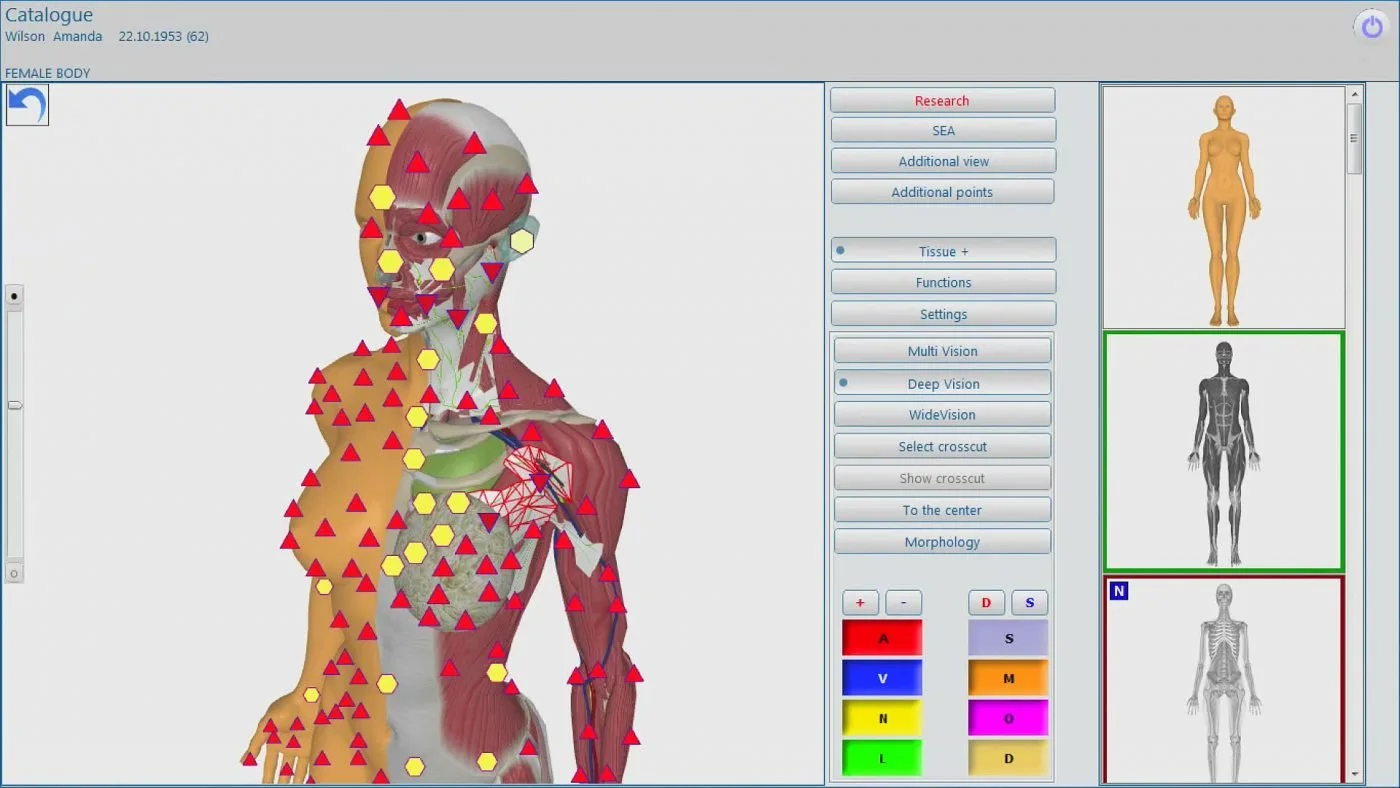
Yes — we can provide Oberon/Metatron-style NLS training for a U.S. wellness clinic, but you should plan this as a package: site readiness (space, clean power, Windows PC on a supported OS), pre-delivery checks (shipping, personnel, PC and network access), supplier-supplied items (the analyzer, software license, documentation and a one‑year warranty) and a clearly defined acceptance procedure that documents operator competency and basic functional tests. Our training covers device unpacking and acceptance, hardware and software setup on compatible Windows systems, patient setup and scan workflow, report generation and export, routine QC and basic troubleshooting, plus the boundary conditions of our after‑sales work (warranty scope, what we will and will not do onsite, and when an outside electrician or IT contractor is required). For Metatron Hunter 4025 (software “Hunter”, 2026), supported operating systems are Windows 11, Windows 10, Windows 8 and Windows 7; MAIKONG provides 1 year warranty and typical dispatch lead time per configuration — details are provided in your quote. (See our evidence and limitations section below for the supplier-declared product facts we used.)
Contents
Evidence used
We referenced MAIKONG product information for the Metatron lines when summarizing software and supported operating systems. Specifically:
These are supplier-declared product attributes from MAIKONG and are the factual basis for our compatibility and delivery statements.
Limitations and risks you should note
Product specifications such as “supported operating systems” and “warranty period” are supplier-provided. We do not substitute those for hands‑on verification at your site. The device manufacturer’s accuracy or performance claims are not independently verified in this article. Local electrical work, network configuration and HIPAA/security compliance must be verified by your clinicians and local contractors. Where we suggest PC hardware, space or procedural checks, treat those as practical, experience-based recommendations; your final purchase order and the supplier quote should state the exact deliverables, training length and travel terms.
Who should read this
This article is written for one person: a U.S. wellness center owner who is evaluating Oberon/Metatron-style NLS equipment and wants a clear, clinic-ready checklist to get accurate installation, training and after‑sales quotes. You’re responsible for site readiness, staff assignment, acceptance testing and making sure the supplier’s boundaries on warranty and after‑sales service match your operational needs.
What ‘Oberon NLS training’ means for a U.S. clinic
When we use the term “Oberon NLS training” in a U.S. clinic we mean a coordinated set of activities and deliverables that prepares your staff to operate the supplied NLS hardware and software reliably within your workflow. That includes: confirming the room and power are fit for purpose, installing the supplied software on a Windows PC that meets the supplier’s supported OS list, practical operator instruction to run routine scans, exporting and archiving reports, basic hardware and software troubleshooting, and a documented handover/acceptance test demonstrating operator competency. Training also clarifies where the vendor’s responsibilities end — for example, we do not perform clinic rewiring, nor do we provide clinical interpretation beyond training on how to generate and export reports.
Installation prerequisites you must confirm before the supplier schedules onsite setup
Before the supplier books an in‑clinic visit, confirm these items and share them in your quote request. Missing items delay installation and can incur additional travel or rebooking fees.
Delivery and access: Exact delivery address, receiving hours, ground‑floor vs. elevator access, any freight restrictions, and the name and contact of the person who will accept delivery and sign the paperwork.
Room reservation and access on install days: Confirm a reserved room for setup and training with uninterrupted access for the agreed installation window and follow-up checks.
Authorized on‑site contacts: Provide the names and contact numbers of the lead clinician, the primary operator, and an IT contact who can approve network changes or proxy settings if required.
Clinical governance: Documentation that explains how patient data will be handled at your clinic (who will be responsible for HIPAA compliance, if applicable), plus any clinic-specific intake or consent forms you want included with training.
PC prepared: A Windows PC configured on a supported OS (see the supportedSystems section below) with administrative access for software installation, or a request for us to install on a supplier-provided laptop.
Site photos and floor plan: Digital photos of the installation room, workstation, power outlets and network ports help us plan cable runs and confirm desk suitability before we travel.
Minimum and recommended PC and network specifications for reliable NLS operation
The supplier explicitly lists supported operating systems for the models we supply. Use those OS declarations as the baseline for compatibility and call them out in your procurement documents.
Model
Software
Supported systems
Lead time
Warranty
These are supplier-declared system compatibility and logistics attributes; check the exact model on your quote.
Practical PC and network recommendations (our operational guidance to reduce installation issues):
Operating system: Use a supported Windows release listed for your model. MAIKONG lists Windows 11 and Windows 10 for the Metatron Hunter 4025 (see table).
Hardware baseline: Use a modern 64‑bit Windows PC with an SSD for the system drive; we recommend having current graphics drivers installed. While exact CPU/RAM minimums are not mandated in the supplier facts, underpowered machines increase software lag and risk file corruption during scans.
Administrator access: The installer needs a local administrator account to register drivers and install the Hunter/4021 software and any required USB drivers or license dongles.
Network: An outbound internet connection for software activation, updates and remote support is strongly recommended. If your PC is behind a strict proxy or restrictive firewall, provide IT access or allow us to work with your IT staff in advance.
Backups and security: Plan routine backups for patient reports and follow your HIPAA or local privacy policies. We will show report export and archiving but will not replace your clinic’s legal or IT responsibilities.
Physical site requirements: space, table, seating, cable runs and environmental considerations
The NLS workstation is small, but installation requires thought about workflow and patient comfort. Confirm the following before supplier arrival.
Dedicated desk surface: A stable table with enough room for a PC monitor, keyboard/mouse, the NLS unit and sensors. Avoid mobile carts that are unstable during scanning.
Seating: Two chairs — one comfortable chair for the patient and one for the operator at the workstation. Operator chairs should allow quick observation of the patient and easy access to the PC.
Cable runs: Ensure a clear route from the workstation to the power outlet and any network port. If the PC will be wall-mounted or in a locking cabinet, confirm that ventilation and cable access are available.
Lighting and privacy: A quiet, private room is preferred for patient comfort and to limit external electromagnetic interference. Avoid placing the unit next to large motors, heavy Wi‑Fi routers, microwave ovens or fluorescent ballast transformers that can introduce electrical noise.
Environmental controls: Typical office temperature and humidity are fine. Avoid excessive dust or damp conditions and maintain standard clinic infection‑control practices for surfaces that come into patient contact.
Electrical and safety checklist for U.S. installations (what to verify locally)
Electrical rules and practices differ by clinic. We list the checks that will commonly be part of a U.S. installation; a licensed local electrician should confirm any work beyond verifying an outlet.
Standard outlet: Ensure a grounded AC outlet (120 V, 60 Hz typical in U.S. facilities) is available near the workstation. If you plan to run multiple devices from the same outlet, consider a dedicated circuit or confirm the circuit can handle the load.
Surge protection and UPS: Use a quality surge protector; consider an uninterruptible power supply (UPS) for graceful shutdown during outages to avoid lost data or corrupted reports.
Grounding and EMI: Proper grounding reduces the risk of electrical noise affecting the sensors. If you suspect noisy electrical equipment nearby, plan to move the workstation or consult an electrician.
Local electrical codes and permits: Any modifications to wiring or installation of clinical-grade outlets must be handled by a licensed electrician and comply with local codes. The supplier will not perform building electrical work.
Safety documentation: Keep the product manual and safety labels accessible; document who performed the electrical confirmation and retain it with your installation records.
Pre-delivery checklist the supplier will typically require and what you must prepare
To get a clean first‑time installation we ask you to provide:
Purchase order or signed sales agreement and billing/shipping contact details.
Clinic address, directions and delivery contact with phone number.
Photos of the proposed installation room and workstation (shots of outlets and network ports help us plan).
Computer details: make/model, OS version, whether it is domain‑joined, and whether the installer should use a local admin account.
Names and email addresses of staff to be trained (so we can send pre‑reading and reserve seats).
Confirmation that you accept supplier travel and service terms listed in the quotation.
What MAIKONG typically supplies with a Metatron/Oberon-style system at delivery
Our standard deliverables vary by model and sales configuration, but the supplier-declared items you can expect to see listed on the quote include:
Software and license registration for the declared software (for MK-018: “Hunter”, softwareVersion “2026”; for MK-017: “4021 NLS”, softwareVersion “2026”).
Documentation and a basic set of user guides for installation, operation, and initial troubleshooting.
Warranty documentation: MAIKONG typically provides a one-year warranty as declared for both models.
Shipping and lead-time terms are model dependent and shown on the quote (example lead times: 2–5 days for MK-018 and 4–5 days for MK-017 as declared by the supplier).
If you require additional peripherals (sample storage, specific printer models, or a supplier-provided PC), request those explicitly on your quote. Pricing and inclusion of extras are handled per quotation.
Standard operator training curriculum: topics and learning outcomes
We structure training so that clinical staff can operate the system safely, generate consistent reports and maintain the device for routine clinic use. The exact session length and format are agreed in the quote.
Core topics we cover
Introduction to the supplied system: identifying hardware components and understanding what is and is not covered by the manufacturer warranty.
Software installation and license activation on a Windows PC; confirming the OS is one of the supported systems declared by the supplier (see table above).
Patient setup and sensor/probe handling, including hygiene and infection-control steps for any patient-contact items.
Performing a standard scan workflow from patient intake to running a scan and generating the report images with epicrisis export.
Report management: saving, exporting, and archiving reports in a format compatible with your EHR or archive procedures.
Routine checks: simple QC tests you can run daily or weekly to confirm the device is operating.
Basic troubleshooting and when to escalate to remote support or a service visit.
Data security, backups, and basic HIPAA-oriented precautions for operating the software in a U.S. clinic environment.
Acceptance test and documentation: learning the clinic’s own acceptance form and operator competency checklist to sign off the handover.
Learning outcomes
Operators will be able to set up and run a standard patient scan and produce the exported report used for clinical review.
Operators will understand the boundaries of device maintenance and what issues require technical service or contractor intervention (electrical, network, or major hardware repair).
Clinical leads will be able to interpret basic software outputs for workflow and referral decisions; final clinical interpretation remains the clinician’s responsibility.
Your clinic will leave with a documented acceptance form and a list of next steps for follow-up support or additional training sessions when needed.
Training formats available: onsite, remote live sessions and hybrid options
We offer flexible formats because clinics have different schedules and budgets. Available formats are typically:
Onsite training: Our trainer visits your clinic, sets up hardware and software and performs hands‑on operator training and acceptance tests. This is the clearest way to confirm room readiness and operator competency in one visit.
Remote live training: If you already have the PC and unit in place, we can conduct live remote training over a secure connection. Remote sessions require reliable internet and a technician on site to assist with any physical connections the trainer cannot perform remotely.
Hybrid: A short onsite visit for hardware handover and a follow‑up remote session for deeper software workflow and report review.
Exact session format, agenda and any travel costs are included in the commercial quote.
Who to train: roles and recommended staffing levels for a busy wellness center
Assigning the right people up front reduces downtime and improves patient throughput. For a single device in a busy wellness center we recommend training the following roles:
Primary operator (1): The staff member who will run the majority of scans. Ideally a clinician or technician with basic computer literacy.
Backup operator (1): A second person trained to cover absences and share workload.
Front‑desk staff (1–2): Short orientation to scheduling, patient pre‑screening and report distribution procedures.
Clinical director or supervising clinician (1): Attends part of the training to understand outputs, acceptance criteria and escalation procedures.
IT contact (as needed): One person familiar with your network to assist during installation and for future updates or firewall issues.
For multi‑device, multi‑clinic operations, scale these roles proportionally and include at least one local “super‑user” who can perform first‑line troubleshooting and train new hires.
A concise, clinic‑ready four‑part checklist you can attach to a quote request
Copy and paste this into your purchase or pre‑installation email to the supplier to speed quoting:
Site readiness: Room reserved with photos attached; grounded outlet within 6 ft of workstation; Wi‑Fi/router location noted; floor plan and delivery access confirmed.
PC/network spec: PC OS and admin access confirmed (state Windows version); local IT contact provided; outbound internet for activation available.
Operator competency checks: Names and roles of staff to be trained (primary operator, backup, front desk, clinical lead); expectation that acceptance test and operator sign‑off will be completed before final payment.
Delivery acceptance form: Supplier to provide an acceptance checklist (hardware present, software activation, one successful sample scan, operator checklist signed, warranty documentation received).
Delivery acceptance: what a practical acceptance test should record
A practical acceptance test is an objective record that the delivered unit is functional and operators can run at least one complete workflow. The acceptance form should record:
Model and serial numbers checked against the invoice.
Software activation successful on the clinic PC and license documentation attached.
One sample scan performed and report exported to a specified folder or EHR; file opened and legible.
Operator competency checklist completed (operator can start a scan, stop it safely, save and export the report and run a basic QC check).
Warranty and support contacts confirmed and signed by both parties.
Keep the signed acceptance form with your purchase records: it defines the handover moment and the start of the warranty period.
After‑sales boundaries — what the supplier typically covers and what you must arrange
In our standard approach the supplier’s after‑sales responsibility includes:
Warranty repair for manufacturing defects within the declared warranty period (supplier-declared 1 year for the listed models).
Remote technical support for software activation, basic troubleshooting and guidance for operator errors.
Supply of spare parts and consumables per the quoted service terms if included in the agreement.
The supplier typically does not cover:
Onsite electrical modifications or building work — hire a licensed electrician for that work.
Clinic IT/network reconfiguration beyond basic assistance; complex proxies or firewalls require local IT.
Clinical interpretation of reports — training shows how to generate and export reports; clinical decisions remain the clinician’s responsibility.
Confirm these boundaries explicitly in your order and service contract so there are no surprises about chargeable service visits or after‑warranty work.
Common questions we hear from U.S. wellness center owners (brief)
Will the software run on my existing PC? Check that your PC runs one of the supplier-declared supported OS versions (see the model table). If in doubt, provide the PC make/model and OS version when requesting a quote so we can advise.
Do you provide ongoing clinical training? We provide operator training and can arrange refresher sessions. Deeper clinical interpretation training is typically offered by third‑party educators; we will not provide clinical diagnostic claims on behalf of your clinic.
What if a future Windows update breaks the software? Maintain a recovery plan: image your system before major OS upgrades, and coordinate updates with us so we can confirm compatibility. Our remote support can assist with known issues but major OS upgrades may require software patches and a service visit if the PC fails to boot the application.
One useful next step — what to include when you request a site‑specific installation, training and after‑sales quote
To get an accurate quote from us, please email Lucy@ihunter4025.com with the following:
Clinic name, full shipping address and contact phone number.
Preferred model (if known) — e.g., Metatron Hunter 4025 (MK-018) or Metatron 4021 (MK-017).
Preferred installation window or preferred week(s) for training.
PC details (make/model and Windows version) and whether you want us to supply a configured laptop.
Names/roles of staff to be trained and whether you prefer onsite, remote or hybrid training.
Any special shipping or customs instructions for your facility.
Phone inquiries are welcome at +8613510907401, or include the above details in an email to Lucy@ihunter4025.com to start the quote process.
If your organization is interested in local distribution or dealership opportunities in the U.S., mention this in the same email and provide a short profile of your business and territory. We review potential partnerships on a case-by-case basis and will respond with our distributor requirements.
Important local reminder: our product compatibility notes and warranty terms are based on MAIKONG’s declared product attributes; consult the quoted contract for the binding terms.
This article is for general information only and does not replace medical diagnosis or clinical judgment, nor does it constitute medical advice.
This content is provided for learning, information sharing and professional communication only. It is not medical advice and is not a basis for treatment or diagnosis. Confirm suitability, operation and purchasing requirements against the product manual, local regulations and qualified professional guidance.