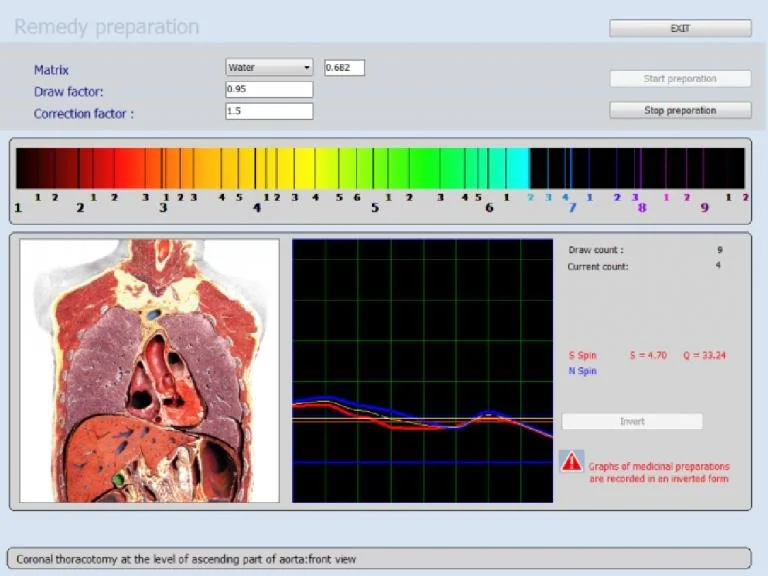
An NLS analyzer system (non‑linear scanner) is a desktop biofeedback diagnostic platform that scans and compares client bio-signatures against a large internal etalon library to generate visual reports and suggested readouts; for a U.S. wellness business the single‑sentence takeaway is: an NLS system can be a client‑facing screening and engagement tool that helps you structure intake, monitor changes over time, and support product or program recommendations — but it is not a medical diagnostic device and must be used with transparent client disclosure, documented consent, and a clear scope of service.
Contents
Direct answer: What an NLS analyzer system is and the single‑sentence takeaway for a U.S. wellness business
We describe an NLS analyzer system as software-driven hardware that records a client’s biofeedback signal and runs automated comparison scans against a preloaded database of organ‑maps, biochemical tables and therapeutic agents to produce images and an “epicrisis” style report. The Metatron Hunter 4025 is one example in our product lineup; the manufacturer lists the system’s software as “Hunter” and reports supported Windows versions and a report format of images with epicrisis (see product record). See the product page for the Metatron Hunter 4025 for manufacturer-supplied technical details. Metatron Hunter 4025 product page.
Practically: if you run a spa, wellness clinic, naturopathic practice, supplement distributor or health‑coaching business, an NLS system is useful when your objective is screening, client engagement, program personalization and progress visualization — provided you keep client communications within the device’s non‑diagnostic limits and integrate it into a documented, consented service model.
Who benefits most in a wellness business and realistic, practical use cases you can start with
Wellness entrepreneurs who gain the most are those whose revenue model depends on repeat client interactions, personalized program sales, and visual evidence of progress. Specific use cases we see work well:
Spas and cosmetic clinics — add a short NLS scan to new‑client intake to show baseline organ or skin‑related images that help tailor topical programs or treatment courses.
Nutrition and supplement practices — use the system as an educational tool to demonstrate areas the software flags (e.g., vitamins, minerals, or food‑related etalons) and then match supplement plans while documenting baseline and follow‑up scans.
Fitness and recovery centers — include a scan in comprehensive wellness packages to support personalized recovery and training recommendations and to track changes across sessions.
Multi‑practitioner clinics — centralize screening so practitioners can prioritize in‑clinic assessments and reduce routine referrals for basic checks.
These are suitability scenarios (possible uses, not verified clinical outcomes). Use them to design service packages that emphasize education, program design, and monitoring rather than diagnosis.
What an NLS analyzer system can and cannot do in a client session — evidence‑aligned limits and practical outputs
What it can provide
In a typical session an NLS system can:
Produce a rapid visual report (images and an epicrisis summary for the Metatron Hunter 4025) that clients find tangible and shareable — useful for engagement and record‑keeping. Manufacturer lists “Images with Epicrisis” as report format for Metatron Hunter 4025.
Compare client signals to a wide etalon library covering organs, biochemical homeostasis, allergens, supplements and other categories, enabling targeted conversation points during intake.
Offer repeatable baseline and follow‑up comparisons so you can document change over time as part of a coaching or product program.
What it cannot and should not be used for
Limitations are important and non‑negotiable in your practice documentation:
An NLS report is not a medical diagnosis. The system is not a substitute for laboratory tests, imaging, or physician evaluation.
Manufacturer accuracy claims (for example, the 95%–98% figure shown in some product materials) are vendor-reported values and should be presented to clients as manufacturer statements rather than independent validation. The Metatron Hunter 4025 product record includes an “Accuracy” field listed as “95%~98%”.
Do not use NLS output to claim disease treatment or to alter prescribed medications without coordinating with the client’s licensed healthcare provider.
Risks and common misuses
The three practical risks we emphasize:
Miscommunication: Clients can misunderstand visual outputs as definitive medical evidence. Always use clear consent language and pre‑session verbal explanation.
Regulatory exposure: Calling results “diagnostic” can attract regulatory scrutiny; maintain the device’s role as a wellness screening tool in marketing and policies.
Operational dependency: Relying on the device to replace clinician judgment or standard intake can reduce care quality. Use reports to inform, not to decide, clinical actions.
Six concrete steps to integrate an NLS analyzer into your practice workflow
The following six steps are practical and operational, designed for a small to mid‑size wellness practice in the U.S. Each step includes the minimal staff roles and documentation you should expect to add.
1) Define the service scope and client journey
Decide whether the NLS scan is an add‑on screening, part of a premium intake, or a recurring monitoring tool. Write a one‑page service protocol that lists who performs the scan (front‑desk staff vs. clinician), what is explained to the client, and the accepted downstream actions (e.g., recommend supplements, refer to a licensed clinician). This protects your team and sets client expectations.
2) Train a primary operator and one backup
Train one staff member as the system operator and one as backup. Training should cover device startup, basic software navigation, interpreting standard reports, formatting client printouts or PDFs, and the consent script. For Metatron Hunter 4025, ensure operator familiarity with the “Hunter” software interface and supported Windows versions. Product record lists “Hunter” software and supported Windows versions.
3) Integrate intake and documentation
Add the NLS scan to your electronic intake form: reason for visit, consent checkbox, and follow‑up measurement schedule. Store exported images and epicrisis text in the client record. Standardize report filenames and include the operator’s initials and session date.
4) Create standardized client scripts
Prepare two scripts: a pre‑scan script explaining the non‑diagnostic nature of the test and a post‑scan script that summarizes suggested next steps (e.g., lifestyle coaching, supplement review, or physician referral). Keep language plain and avoid medical claims.
5) Pilot and measure engagement
Run a 30‑day pilot with 20–50 clients. Track three metrics: client understanding (simple post‑session survey), conversion to programs/products, and follow‑up retention. Use this data to adjust session length, pricing, and operator scripts.
6) Lock documentation into compliance and consent
Add an explicit consent clause to your intake forms that states the system is a screening tool and not a medical diagnostic device. Include contact information for follow‑up with a licensed clinician when the scan indicates potentially serious concerns.
How to present NLS findings to clients so they understand value without overclaiming
Presentation matters more than the raw report. We recommend a two‑part approach: visuals for engagement and a concise verbal summary for clarity.
Visuals: Give clients a printed or PDF copy of the report images with a one‑page legend explaining categories (organs, nutritional markers, allergens) and the meaning of colors or flags in plain English.
Verbal summary: Use three sentences — 1) what the scan measured, 2) what the main flagged area(s) mean in your practice’s scope (e.g., “areas to consider for nutrition or lifestyle review”), and 3) recommended next steps (e.g., program trial, laboratory testing with a clinician, or referral).
Avoid the words “diagnosis,” “disease,” or “definitive” in client summaries. Instead use “screening result” or “system output.”
Minimum technical and room requirements to run sessions in the U.S. (practical checklist and local considerations)
The following checklist covers what you must plan for technically and physically. Some items reference manufacturer-supplied system compatibility.
Desktop or laptop meeting the software requirements — verify supported Windows versions. Metatron 4021 lists supported systems including Windows XP through Windows 11 and Metatron 4025 lists Windows 7, 8, 10, 11.
Stable power outlet and surge protection (U.S. 110–120V mains). Note: we do not have an authoritative product electrical installation checklist for U.S.-specific wiring and should confirm with an electrician or the device manual.
Quiet, private room with a comfortable chair for the client and a desk for the operator; minimal electromagnetic interference (avoid placing the unit next to heavy industrial equipment or large metal structures).
Client privacy measures: secure storage or encrypted file location for digital reports and a printed consent form.
Reliable internet connection for software updates and manufacturer support where applicable.
Missing evidence note: current, model‑specific U.S. electrical/installation requirements are not supplied in our evidence pack; confirm with the model manual before commissioning physical installations.
Training and operational skills your team needs (what to train for, what to outsource)
Train in-house for the routine operational skills; outsource higher‑level interpretation and IT tasks.
Outsource or contract: advanced clinical interpretation, software customization, and technical integration with your practice management system unless you have in-house IT staff comfortable with Windows software and file handling.
Periodic refresh: schedule quarterly reviews of operator accuracy and script consistency; rotate operators through supervised sessions during the first 90 days.
Supplier and configuration checklist: the non‑procurement questions every wellness entrepreneur must answer before requesting a quote
Before you ask for a formal quote, prepare answers to these practical configuration questions. They keep vendor conversations focused on fit rather than price alone.
Intended business model: Will scans be offered as an add‑on, part of a program, or bundled into a subscription?
Language and user interface needs: Do you require software or training in English only, or do you need bilingual support?
OS and IT environment: Which Windows version will you run? Confirm compatibility with your existing computers. The Metatron Hunter 4025 lists specific supported Windows versions.
Report format and export: Do you need PDF export, image files, or integration with an electronic health record? Confirm the product’s export formats; for the Metatron Hunter 4025 the listed report format is “Images with Epicrisis” data-fact-id=”122″.
Follow‑up materials: Do you want the vendor to provide consent templates, client leaflets or operator scripts?
Support and warranties: What warranty length and local support options are available? Manufacturer listings often show warranty durations (for example, a 1‑year warranty is commonly listed).
Local compliance: Who in your state will confirm allowable advertising language and consent forms? Plan to consult with local counsel or an appropriate regulator if you plan to use clinical language.
Service, software and language support considerations that affect usability and client experience
Service and software support influence your uptime and ease of onboarding. Key points to check:
Software updates and backward compatibility — will updates retain your client database and report formats?
Language support — verify whether the interface, manuals and training are in English and whether the vendor can provide additional language packs if needed.
Helpdesk access — confirm available channels (email, phone, remote support) and any associated costs for premium support or training.
Customization — if you want to add a practice logo to reports or adjust templates, ask whether the vendor supports report branding or will provide editable templates.
Simple comparison points to evaluate vendors and desktop software without relying on model names or unverified claims
When comparing vendors, use criteria that matter to daily operations rather than marketing claims:
Library coverage and update policy — how many etalons does the software ship with, and how often are they updated?
Exportability — can you export high‑resolution images and text summaries for client records?
OS compatibility — will the software run on your existing hardware and Windows version?
Service and localization — local technical support, training availability and language support for your operators and clients.
Warranty and spare parts — length of warranty, availability of replacement probes or components, and local repair options.
Compliance, safety and client consent: what to include in your policies (U.S. practice focus)
Your client-facing legal and safety documents should be short, clear and practical. Include the following elements:
Consent statement: explain the nature of the scan, that it is a screening tool, and that it does not replace medical testing.
Limits of service: explicitly state what you will and will not do with the results, and that the client should seek medical advice for medical conditions.
Data handling: where reports will be stored, retention period, who has access and how clients can request deletion or copies.
Referral pathway: a defined process for urgent findings, including written guidance for immediate referral to licensed healthcare providers.
Common implementation pitfalls and how to avoid them in the first 90 days
We commonly see the same early mistakes; here are practical fixes:
Pitfall: Weak consent and overpromising. Fix: Standardize your consent script and limit marketing language to “screening” and “education.”
Pitfall: Poor operator training. Fix: Certify two operators and require supervised sessions before live clients.
Pitfall: No pilot metrics. Fix: Run a small pilot and measure client understanding, conversion and retention before full rollout.
Pitfall: Ignoring data security. Fix: Use encrypted storage or secure cloud backups and set retention policies aligned with local laws.
When manufacturers supply model facts, we preserve them as vendor self‑reported data. The table below displays a short, accurate snapshot of two documented models for planning purposes.
Large etalon list across organs, toxins, supplements and more (company‑reported)
MOQ 1pcs; Lead time 4–5 days; Warranty 1 year
Supplier conversation checklist before you request a quote
When you contact a supplier, include these items in your inquiry to get a usable quote quickly:
Practice type and intended use cases (screening, monitoring, supplement consultations, spa intake).
Number of locations and how many devices per site.
Desired export formats and integration needs (PDF, image, CSV, EHR integration).
Language and training requirements for staff.
Requested warranty, spare parts and on‑site or remote support preferences.
Ask for operator guides, consent template samples and sample report images before purchase.
One useful next step
FAQ — short practical follow‑ups
Can I legally use an NLS system in a U.S. wellness business?
Yes, many wellness practices use NLS systems for screening and client engagement. Legality depends on truthful marketing, proper consent, and avoiding claims of medical diagnosis or treatment. Run your client materials by local counsel if you intend to use clinical language.
Do I need a medical license to operate the device?
Operating the device as a screening tool for wellness does not by itself create a licensing requirement, but you must not practice medicine or provide medical diagnoses unless you are a licensed clinician. Define clear referral and escalation policies.
What support materials should I request from a vendor before buying?
Ask for operator training details, sample reports, consent templates, language packs, warranty terms and a description of software update policies. These items materially affect your rollout and client experience.
Evidence and known product facts
Where we reference specific model information in this article, those items are drawn from the manufacturer’s product records:
Metatron Hunter 4025 — software “Hunter”; supported Windows versions; report format listed as “Images with Epicrisis”; manufacturer‑reported accuracy 95%~98%; counts such as 886 organs and 1498 homeopathy entries are vendor data.
Metatron 4021 — software “4021 NLS”; listed supported Windows systems include versions from XP to Windows 11; vendor supplies a long etalon list across organ preparations, toxins, supplements and more.
These are manufacturer‑reported facts and should be treated as vendor specifications rather than independent validation.
Limitations and missing evidence
Important limitations to keep in mind:
We do not have model‑specific U.S. electrical installation instructions in our evidence packet; verify power and grounding requirements in the device manual before installation.
Manufacturer accuracy percentages are claimed by the vendor; independent validation in peer‑reviewed literature is not provided in the supplied product records.
The product records list etalon libraries and counts, but those entries are company artifacts and not clinical endorsements; treat them as catalogue content used for software comparisons and client education.
We aim to give you practical, operationally relevant advice so you can decide whether an NLS system fits your U.S. wellness business and what to ask vendors next. If you’d like a tailored configuration quote or to discuss language, training and support options, contact Lucy@ihunter4025.com or WhatsApp/phone +8613510907401.
This article is provided for general informational purposes and does not replace medical diagnosis or treatment; it is not medical advice.
Want to explore becoming a U.S. local distributor or agent for our systems? Email Lucy@ihunter4025.com with “U.S. Distribution” in the subject and a brief outline of your business model, region and support capabilities.
Company contact: MAIKONG Industry Co.,Ltd — website: https://ihunter4025.com; email: Lucy@ihunter4025.com; phone/WhatsApp: +8613510907401 (also reachable via https://wa.me/861351090701).
Nota: This information is for general reference only and cannot substitute for a physician’s diagnosis or be used as medical evidence.
This content is provided for learning, information sharing and professional communication only. It is not medical advice and is not a basis for treatment or diagnosis. Confirm suitability, operation and purchasing requirements against the product manual, local regulations and qualified professional guidance.
If you want a tailored configuration or a quote that matches your business model and language needs, email Lucy@ihunter4025.com with a short note describing your practice type, intended use cases, and any preferred language or support requirements. You may also contact us by phone/WhatsApp at +8613510907401 (or https://wa.me/861351090701).