Categories
- Knowledge and help (92)
- Blog (271)
- Oberon (12)
- bioplasm nls (14)
- Diacom nls (20)
- Metatron Hunter 4025 NLS review (41)
- Metatron Hunter Manual (7)

The Metatron Hunter 4025 NLS represents cutting-edge technology in non-linear diagnostic systems. With its ability to analyze up to 1432 organs and tissues with remarkable precision, maintaining this sophisticated equipment is crucial for several reasons:
Regular maintenance ensures the device maintains its impressive 95-97% diagnostic accuracy. Even minor issues can affect the precision of your health analysis results, potentially leading to incorrect assessments.
Proper care significantly extends the operational life of your investment. The Metatron Hunter 4025 NLS is designed to provide years of reliable service when maintained according to manufacturer specifications.
MAIKONG provides a comprehensive 2-year warranty for the Metatron Hunter 4025 NLS. However, this warranty remains valid only when proper maintenance protocols are followed and documented.
Regular maintenance prevents performance degradation and ensures consistent results across all diagnostic functions, from bacterial research to entropy analysis and comparative assessments.


Establishing a regular maintenance schedule is essential for keeping your Metatron Hunter 4025 NLS in optimal condition. MAIKONG recommends the following maintenance intervals:
| Maintenance Task | Frequency | Importance | Tools Required |
| External Cleaning | After Each Use | High | Microfiber cloth, approved cleaning solution |
| Headphone Sensor Cleaning | Weekly | Critical | Sensor-specific wipes, alcohol pads |
| Connection Cable Inspection | Monthly | Medium | Visual inspection |
| Software Updates | Quarterly | High | Internet connection, admin access |
| Calibration Check | Semi-Annually | Critical | Calibration kit or professional service |
| Comprehensive System Check | Annually | Critical | Professional service recommended |
MAIKONG offers comprehensive maintenance services performed by certified technicians. Contact our technical support team to schedule your annual system check.

Proper cleaning of your Metatron Hunter 4025 NLS is essential for maintaining accurate diagnostic results. Each component requires specific cleaning methods to prevent damage while ensuring optimal performance.

Use only mild, non-abrasive cleaning solutions specifically designed for electronic equipment. MAIKONG recommends:
Never use harsh chemicals, abrasive cleaners, or excessive liquid that could penetrate the housing.

Important: The bio-inductor headphone sensors are among the most sensitive components of your Metatron Hunter 4025 NLS. Improper cleaning can affect diagnostic accuracy or damage the sensors.
Follow these steps for proper headphone sensor cleaning:
For optimal hygiene, especially in clinical settings, MAIKONG recommends replacing the headphone sensor covers regularly. Replacement covers can be ordered directly from our website.
Order genuine MAIKONG replacement sensor covers to maintain optimal hygiene and performance.

The connection cables and testing cup require regular inspection and cleaning to ensure reliable data transmission:
Pro Tip: Store cables properly by loosely coiling them without tight bends. This prevents internal wire damage and extends cable life. Never wrap cables tightly around the device or pull cables by the wire rather than the connector.

Maintaining the software components of your Metatron Hunter 4025 NLS is equally important as hardware maintenance. The system software controls all diagnostic functions and analysis capabilities.
Ensure your computer meets these minimum requirements for optimal performance:
| Component | Minimum Requirement | Recommended |
| Operating System | Windows 7/8/10/11 | Windows 10/11 (64-bit) |
| Processor | 1 GHz Pentium III | Intel Core i5 or higher |
| RAM | 512 MB | 8 GB or higher |
| Hard Drive Space | 1 GB free | 10 GB or more |
| USB Ports | 2 USB ports | 2 USB 3.0 ports |
| Display | SVGA 1024×768 | Full HD or higher |

Regular software updates ensure your Metatron Hunter 4025 NLS has the latest diagnostic capabilities and security features. MAIKONG recommends checking for updates quarterly.
Our technical support team is available to guide you through the update process or answer any questions.
The Metatron Hunter 4025 NLS stores valuable diagnostic data that requires proper maintenance:

Even with proper maintenance, you may occasionally encounter issues with your Metatron Hunter 4025 NLS. Here are solutions to common problems:
When to Contact Professional Support: If you’ve attempted the troubleshooting steps above and continue to experience issues, contact MAIKONG technical support. Our specialists are trained to diagnose and resolve complex issues with your Metatron Hunter 4025 NLS.

Proper storage and transportation are essential for protecting your Metatron Hunter 4025 NLS when not in use or when relocating the equipment.
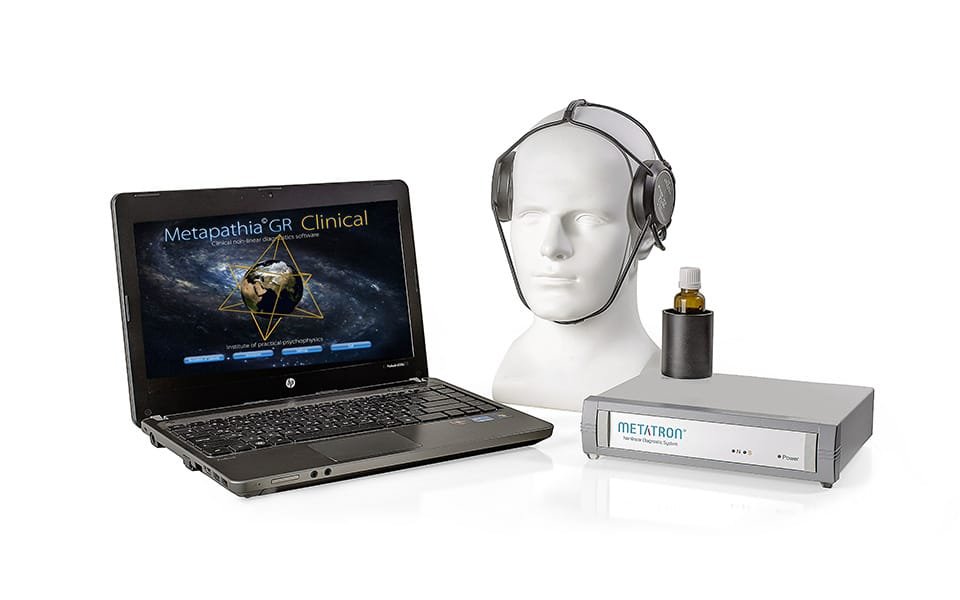
When transporting your Metatron Hunter 4025 NLS, follow these guidelines to prevent damage:
“Proper storage and transportation are as important as regular maintenance for preserving the accuracy and longevity of your diagnostic equipment.”
Your Metatron Hunter 4025 NLS represents a significant investment in advanced diagnostic technology. By following the maintenance procedures outlined in this guide, you can ensure optimal performance, accurate results, and maximum longevity for your device.
Regular cleaning, proper storage, software updates, and professional servicing when needed will help maintain the exceptional 95-97% accuracy that makes the Metatron Hunter 4025 NLS a leader in non-linear diagnostic systems.
MAIKONG is committed to supporting our customers with comprehensive technical assistance, training resources, and maintenance services. Our team of specialists is available to answer questions and provide guidance on any aspect of your Metatron Hunter 4025 NLS system.
Contact our technical support team for personalized assistance with your Metatron Hunter 4025 NLS or to learn about our full range of advanced diagnostic systems.
Our flagship non-linear diagnostic system with advanced meta-therapy capabilities and comprehensive health analysis.
Advanced diagnostic capabilities with enhanced visualization and deeper tissue penetration for comprehensive analysis.
Professional-grade system for clinical settings with advanced diagnostic and therapeutic capabilities.
Interested in distributing MAIKONG’s advanced diagnostic systems? Join our global network of partners and bring cutting-edge technology to your market.