
Categories
- Knowledge and help (92)
- Blog (271)
- Oberon (12)
- bioplasm nls (14)
- Diacom nls (20)
- Metatron Hunter 4025 NLS review (41)
- Metatron Hunter Manual (7)
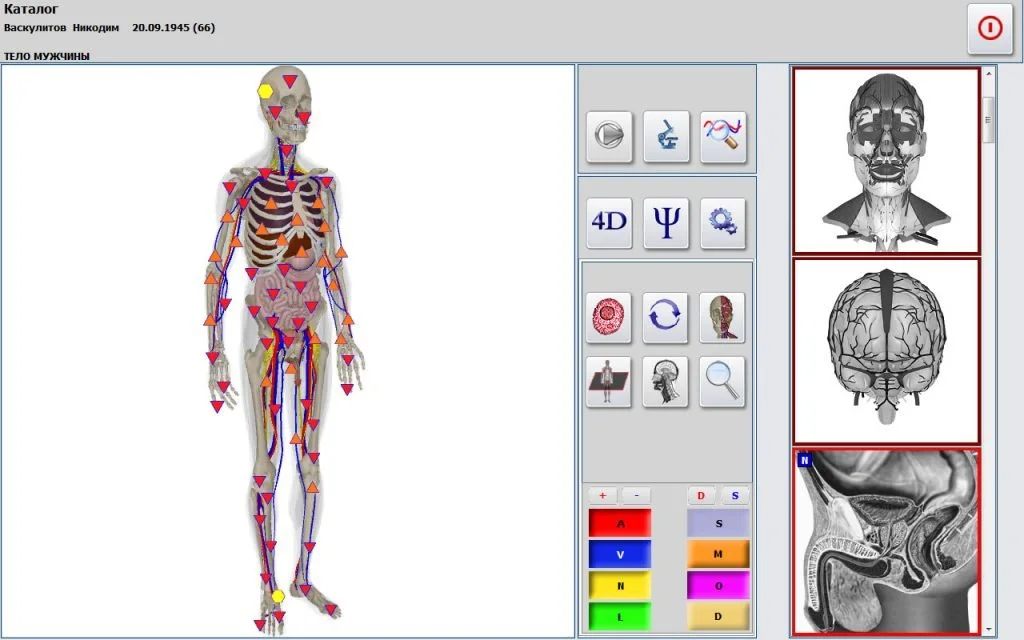
Metapathia GR Hunter is a software variant used with Hunter‑style NLS platforms; for U.S. wellness centers it can produce the same type of session output your team expects from Hunter-compatible systems (images with epicrisis, meridian, food and emotional analyses). Before purchase you must confirm (1) that the software version you buy is compatible with your PC and Windows release, (2) the language/localization you require, and (3) the exact bundle (standalone Metapathia GR Hunter vs. Hunter preinstalled on Metatron Hunter 4025). We supply the Metatron Hunter 4025 NLS with Hunter software and can quote a U.S. configuration; for Metapathia GR Hunter specifically, request the exact software build and language pack in your inquiry so we can confirm compatibility and licensing.
When buyers say “Metapathia GR Hunter” they usually mean a commercially distributed Hunter‑style software package derived from the Metapathia family. Market listings and product pages in some regions describe a Polish-language release and other local variants; this is a software SKU rather than a separate scanner model (data-prepared-source=”competitor_learning_materials:186277″). That matters for a U.S. wellness owner: the term points to a software option you can run on an NLS platform, not to a distinct hardware instrument.
Practically, Metapathia GR Hunter installs like other Hunter-class programs and produces session outputs (visual organ maps, epicrisis summaries and analytic modules such as meridian and food analyses). If you plan to use it in a clinic, treat the purchase as a software-license decision tied to whichever NLS hardware you already own or intend to buy.
There are two common ways Metapathia GR Hunter ends up in a U.S. clinic:
From a systems perspective, the important checks are the same either way: the PC operating system, USB or serial drivers, the NLS hardware firmware and the language/localization of the software license. Our Metatron Hunter 4025 line ships with Hunter software support and lists supported Windows systems (Windows 11, Windows 10, Windows 8, Windows 7). If you ask for Metapathia GR Hunter specifically, tell us which hardware you plan to use so we can confirm a tested configuration.
Sessions run with Hunter‑class software produce a set of observable files and patient outputs that your staff will handle directly. Typical outputs include:
Those outputs are meant as informational screening reports. They are not clinical diagnoses by regulation and should be used to guide wellness conversations, not to replace medical evaluation.
Below are the supplier‑reported facts we use when discussing Hunter‑class installations. These items come from our product record for the Metatron Hunter 4025 NLS analyzer and the associated Hunter software package; they are the exact values supplied by our technical files (data-fact-id=”122″).
We include these values in proposals and pre‑sale checks. If you require a written data sheet or a specific software build number, request it in your quote so we attach the exact files and license terms.
Set aside a private room with the NLS workstation and a standard intake form that records health complaints, medications and prior tests. Conduct the scan using the same protocol each time (same posture, same probe placement, same software options). Save the session images and the epicrisis file to the client’s record. Use the meridian and food profiles as topics for your wellness consultation — not as clinical diagnoses.
For repeat clients create a baseline scan and store it with a timestamped report. When clients return, perform scans under the same conditions and compare the images and numeric indices that the software presents. Tracking relative trends is the most practical way to derive value from NLS outputs in a wellness setting.
Translate the software outputs into actionable coaching steps (dietary adjustments, lifestyle advice, supplement suggestions where legally permitted). Export the images with epicrisis to PDF for client files and to support any referral to medical providers. Record the client’s subjective response and objective follow-ups in your practice chart.
Hunter‑class software comes in multiple regional builds. Commercial listings have shown Polish and other localized versions (data-prepared-source=”competitor_learning_materials:186277″). If you require Metapathia GR Hunter specifically, state “English UI and English reports” in your inquiry and we will confirm whether the SKU includes that language or requires a separate language pack.
Supported systems reported for the Metatron Hunter 4025/Hunter software include Windows 11, Windows 10, Windows 8 and Windows 7 (data-fact-id=”122″). Provide your exact OS build when you request installation files.
Our Metatron Hunter 4025 devices ship with a one‑year warranty (data-fact-id=”122″). Training options are available; specify whether you want remote training, on‑site setup or train‑the‑trainer so we can quote the appropriate package.
Many Hunter‑class applications run on Metatron hardware; however, software licensing and tested compatibility must be confirmed per case. Tell us the exact software build and the Metatron firmware version in your request and we will check the tested match.
From a practice point of view the differences fall into three areas:
In short: if you want a single vendor responsibility for hardware, software and initial support, purchasing the Metatron Hunter 4025 with Hunter software preconfigured is the safer operational choice. If you already own compatible Hunter‑class hardware and only need a software package in a particular language, Metapathia GR Hunter as a separate license can work — but confirm compatibility first.
To get a precise U.S. quote or discuss a local distributor relationship, email Lucy@ihunter4025.com or contact WhatsApp/phone +8613510907401. Include the following in your message so we respond with the right configuration and licensing terms:
We will then confirm license terms, shipping options to the U.S., and any distributor margins if you are proposing a regional partnership. Pricing and final configuration are provided on inquiry; list the items above to speed the response.
Our practical recommendations above rely on the device and software parameters recorded in our product files for the Metatron Hunter 4025 NLS analyzer and Hunter software (data-fact-id=”122″). Specifically we used the supplier entries for:
We also noted marketplace references to Metapathia GR Hunter regional builds (Polish version listings) as background when discussing localization; those references are commercial listings and used for context (data-prepared-source=”competitor_learning_materials:186277″).
We must be candid about limitations and items that require your verification:
Before final purchase or promotion in your U.S. wellness center verify the following:
If you want a tailored quotation or to discuss becoming a U.S. distributor, email Lucy@ihunter4025.com or WhatsApp/phone +8613510907401. In your initial message include your clinic type, desired bundle (Metatron Hunter 4025 turnkey or Metapathia GR Hunter license for existing hardware), required language, and Windows version. We will confirm compatibility, supply available language packs, and send a quote with shipping and licensing details.
A — Often yes, but compatibility and licensing vary by build. Provide hardware model and firmware version so we can confirm the tested combination.
A — We provide warranty coverage and optional service agreements; specify the type of support you want in the inquiry so we can include spare parts and local service options in the quote.
A — Reports are image-based with epicrisis summaries; export formats and EMR integration options are configuration items. Tell us the format you need and we will confirm technical export options for the build you order.
For a U.S. wellness center that wants predictable installation and vendor support, purchasing a Metatron Hunter 4025 with the Hunter software preinstalled simplifies deployment and gives you a single technical contact for hardware, drivers and the software build (data-fact-id=”122″). If your priority is a particular Metapathia GR Hunter language build and you already own compatible hardware, a standalone Metapathia GR Hunter license can work — but only after you verify tested compatibility, licensing and language. In either path, specify Windows version and the operator language up front so we can avoid rework.
This article is for general information only and does not replace diagnosis or treatment by a licensed medical professional. It is not a medical device regulatory clearance statement.
This content is provided for learning, information sharing and professional communication only. It is not medical advice and is not a basis for treatment or diagnosis. Confirm suitability, operation and purchasing requirements against the product manual, local regulations and qualified professional guidance.
Before you request a quote, gather these items so we can deliver an accurate configuration and avoid compatibility delays.
To request a configuration quote or distributor discussion, contact Lucy@ihunter4025.com or WhatsApp/phone +8613510907401. Provide the items listed in the “How to request a quote” section so we can prepare an accurate U.S.-focused proposal.
