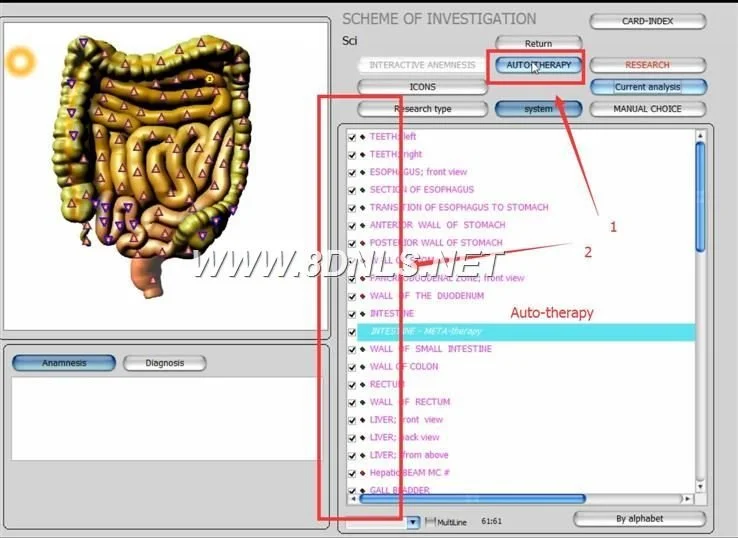
We summarize: an NLS bioresonance device can be a clinic-level screening and client-engagement tool—useful for broad, non-invasive functional assessment, education and tracking—but it is not a stand-alone diagnostic test or a replacement for lab work, imaging, or licensed medical diagnosis. Expect visual reports and suggested target areas, software-driven comparisons, and operator-dependent interpretation. Before you buy, verify the exact model software, supported Windows versions, training and after‑sales support, and confirm the supplier’s stated specs for scanning method and supported libraries. For a product quote or configuration tailored to U.S. practice needs, contact Lucy@ihunter4025.com or WhatsApp +8613510907401.
Contents
Direct answer: What an NLS bioresonance device can and cannot do for a functional wellness practice
As factory specialists, we view NLS (nonlinear system) bioresonance devices primarily as adjunctive assessment and client-communication tools. Practically, they: provide rapid, non‑invasive scans; generate image-based reports and “epicrisis” summaries; offer libraries for organs, microorganisms, allergens and nutraceuticals; and allow repeated measures for longitudinal tracking. They can help focus further testing or lifestyle interventions and improve client engagement during intake and follow-up.
They cannot: provide definitive clinical diagnoses, replace validated laboratory or imaging tests, or legally substitute for the judgment of a licensed physician. Device outputs are software‑based correlations and must be interpreted within clinical context; the device does not prove causation or treatment efficacy.
Why practitioners ask about NLS devices now — common clinic use-cases and realistic expectations
Practitioners ask because they want quick, non-invasive ways to broaden intake, show clients visual reports, and monitor perceived changes over time without repeated blood draws. Common, realistic clinic use-cases include:
Intake screening to highlight systems or organ groups that merit focused laboratory testing or conventional referral.
Client education: visual reports (images with epicrisis) to explain where symptoms may relate to systems or lifestyle factors and to document progress between visits.
Support for personalized recommendations: supplementing, not replacing, clinical reasoning when selecting nutraceuticals, diet changes, or targeted functional tests.
Program tracking: repeated scans to create a record of relative changes in software indices over serial consultations.
Expectations to avoid: expecting the machine to “diagnose” conditions that require confirmatory tests, or to provide clinically proven treatment regimens. We advise treating device outputs as hypothesis-generating signals rather than definitive answers.
Primary clinical questions an NLS device helps you explore during intake and follow-up
Use the device to explore operational questions that feed your clinical workflow, for example:
Which organ systems show relative deviation on initial scan and therefore merit targeted labs (e.g., liver panel, thyroid, micronutrients)?
Are there patterns that align with the client’s symptom clusters (e.g., gut‑brain, endocrine, musculoskeletal) that would direct your next functional test?
How does the client’s profile change after an intervention (supplement, diet, or therapy) when compared to the baseline scan?
Which lifestyle or environmental triggers appear repeatedly in the software library (e.g., food sensitivities or allergens) that justify controlled elimination or confirmatory testing?
Each of these is a clinical question the device can help you structure; confirmatory testing and clinical judgment remain essential before treatment changes.
How bioresonance biofeedback works — a concise, evidence-aware explanation (practical, not technical)
Bioresonance systems use bioelectrical signal capture, software analysis against internal reference libraries, and pattern-matching algorithms to produce images and indices that the software correlates with organ systems, microbes, allergens and substances. The device’s library size and the scanning algorithm influence the range of comparisons reported. For example, our Metatron Hunter 4025 model references libraries covering multiple items such as organs, pathomorphology entries, microorganisms and nutraceuticals; the device software labels outputs and generates an image-based “epicrisis” report for review (data-fact-id=”122″).
Important practical notes: software outputs are only as good as the reference data and the algorithm’s assumptions. They tend to be sensitive to operator setup, environmental electrical noise, and the clinical context you provide. Use the scans as a structured screening layer and a client-facing narrative that complements objective testing.
Practical session workflow: step-by-step use in a typical wellness consultation
Below is a practical workflow you can adapt to a 45–90 minute functional consultation. These steps emphasize clinical framing and documentation rather than technical minutiae.
Before the client arrives
Prepare client intake: current medication/supplement list, chief complaints, recent labs, and informed-consent wording that explains the device is a non-diagnostic screening tool.
Confirm PC and software readiness (see Operational checklist below).
During intake
Briefly explain purpose: screening, hypothesis generation, and tracking — not diagnosis.
Collect focused history tied to systems you plan to scan.
Perform the scan per manufacturer steps in the manual; follow the software prompts to generate images and epicrisis summaries.
Review results with the client: highlight concordant findings with the clinical history and identify one or two prioritized next steps (e.g., targeted lab tests, elimination trial, referral).
Follow-up
Repeat the scan when you want to document a change after an intervention. Use identical pre-scan conditions (same time of day, similar hydration, medication notes) to reduce variability.
File images and epicrisis in the client chart and use them to discuss objective trends.
Do not base treatment changes solely on software outputs without clinical corroboration.
Documentation and reporting: what outputs to expect and how to use them with clients
Typical outputs include visual organ maps, comparative indices, and an “epicrisis” narrative exported as images or a simple report. The Metatron Hunter 4025, for instance, produces reports in “Images with Epicrisis” format (data-fact-id=”122″).
Use reports to:
Record baseline status and follow-up comparisons.
Support informed discussions with clients about which conventional tests to order next.
Provide visual material that improves understanding and adherence—while being explicit about limitations.
Retention practice: store original image files in your electronic health record (EHR) with date/time stamps and clinician notes that describe the clinical decision prompted by the scan.
Clinical limitations and ethical boundaries: what to avoid, how to explain findings to clients
We recommend these firm boundaries in your practice:
Do not present scan results as a definitive diagnosis. Use language such as “suggests,” “indicates a pattern consistent with,” or “may warrant further testing.”
Never treat solely on device output if the client exhibits red-flag symptoms that require immediate medical evaluation.
Be transparent about the device’s scope: it is a screening and engagement tool, not a laboratory instrument.
When explaining results, keep it simple: compare the scan to a “first-pass screen” and pair each suggested next step with specific, conventional follow-ups (lab tests, imaging, or specialist referral). Document the client’s agreement and the rationale for any next steps.
Selection considerations for U.S. practices: integration with clinic workflow, software compatibility, language and support needs
Key factors to verify before purchase:
Software and OS support: confirm the shipped software version and supported Windows versions. For example, our Metatron 4025 uses Hunter software, version 2026, and lists support for Windows 11, Windows 10, Windows 8 and Windows 7 (data-fact-id=”122″).
Report format and export options: ensure image and PDF export for your EHR.
Language support and documentation: confirm English-language manuals and training for U.S. staff.
Training and documented protocols: ask the vendor for an operator manual and training outline to reduce operator variability.
After-sales support and upgrade policy: confirm warranty (we supply 1 year for models described here) and available software updates.
Regulatory and marketing claims: avoid suppliers who assert the device is an FDA-cleared diagnostic unless they provide verifiable documentation. Use vendor declarations like CE or ISO 9001 as background information; these are not clinical approvals for diagnostic claims in the U.S.
We declare our certifications as ISO 9001 and CE per our company profile; these attest to certain quality management and European market conformity declarations but do not equate to U.S. diagnostic approval. Treat such declarations as part of vendor due diligence, not clinical validation.
Operational needs and simple installation checklist for U.S. clinics (space, computer compatibility, staff training considerations)
Minimal operational checklist to prepare your clinic:
Dedicated exam area with low electrical interference and comfortable seating for the client.
Windows PC that meets the software’s system requirements — confirm 64-bit/32-bit compatibility with the supplied software. The Metatron models list support for Windows 11/10/8/7 and earlier systems (data-fact-id=”119″ data-fact-id=”122″).
Reliable internet connection for software updates and remote support (if offered).
Backup and storage plan for image reports (secure, HIPAA-compliant storage if you retain health information).
One or two trained staff members who understand the device workflow and can run scans, export reports, and explain results in patient-friendly language.
Model comparison snapshot
When comparing two models from our product family, check these manufacturer-declared fields directly. The table below presents selected vendor-supplied specifications for two models; use them as a starting point for discussion with your vendor representative.
Model
Software / Version
Supported OS
Notable specs
Lead time / Warranty
Metatron 4021 (MK-017)
4021 NLS (2026)
Windows 11, Windows10, Windows8, Windows XP
Use scope: broad clinic/education/sports/cosmetic applications (vendor-declared)
Notes: these values are vendor-reported. “Accuracy” percentages are manufacturer claims; request published validation or test data if accuracy is a critical purchase criterion.
Clinical limitations, verification and risks
Known limitations you must factor into clinical use:
Operator and environment variability can change outputs; standardize pre-scan conditions.
Software libraries are vendor-specific and evolve; updates can change report content and historical comparability.
Manufacturer accuracy claims (for example, 95%~98% on some models) are declarations—ask for independent, reproducible validation if that figure drives your decision (data-fact-id=”122″).
Regulatory risk: marketing a device as a diagnostic in the U.S. without appropriate approvals may create regulatory and legal exposure. Keep marketing and patient communication within non-diagnostic language unless an FDA clearance or certification specific to the U.S. is documented.
We recommend a conservative adoption: use the device to augment, not replace, proven clinical tests and licensed medical judgment.
How to evaluate vendor claims and what verification to ask for (company identity, demonstrable training, after-sales support)
When evaluating a vendor, ask for the following and document responses:
Company identity and local representation: business registration, physical address, and U.S. point of contact if available.
Product documentation: operator manual, software change-log, and data export formats.
Training syllabus: what is included in initial training, how long, and whether competency assessment is part of training.
After-sales support: warranty details (we supply a 1-year warranty on models listed), remote troubleshooting, and update policy for software libraries.
Clinical validation: any published studies or internal validation data the vendor is willing to share. If none exist, proceed with a conservative trial protocol.
Regulatory statements: explicit, written clarification of what certifications the vendor declares (for example, ISO 9001 and CE are vendor declarations in our profile) and what they do not claim (e.g., U.S. diagnostic approval). Do not accept ambiguous marketing language about “diagnosis” or “FDA clearance” without documentation.
Concrete next steps for busy practitioners: trial, demo, and what to bring to a demo
To evaluate an NLS device efficiently, schedule a vendor demo or on-site trial with these preparation steps:
Bring a concise clinic brief: average patient profile, main clinical questions you hope the device will help answer, and the EHR format you use.
Request a live scan on a consenting staff volunteer so you can observe the full workflow, report export, and discussion scripting.
Test report export into your EHR: ask the vendor to export sample images/PDFs and confirm they import cleanly into your system.
Clarify training scope, language, and documentation in writing during the demo. Confirm warranty and what is covered.
Ask for a written quote that itemizes the hardware, software license, training, and shipping terms; pricing is available on inquiry.
Bring these decision-makers to the demo: a clinician who will interpret outputs, an office manager who will handle billing/EHR integration, and an IT person who will verify PC compatibility.
Common practitioner questions and brief answers (FAQ)
Can I use the device to screen every new client?
Yes, as a screening tool. Prioritize clients where non-invasive visualization can improve engagement or guide next-step testing. Always document that the scan is an adjunctive, non-diagnostic tool.
Do the devices work on tablets or Macs?
Most current NLS software is Windows-based. Confirm specific OS compatibility with the vendor; our declared support lists Windows 11/10/8/7 across models (data-fact-id=”119″ data-fact-id=”122″).
What training is required?
Expect basic operator training to run scans and export reports, plus clinician-focused training to interpret outputs in your practice context. Ask for a documented syllabus.
How we recommend verifying claims before purchase
Practical verification steps:
Request an on-site or live remote demo and run scans on staff members.
Ask for a copy of the operator manual and example reports from the exact software version you will receive.
Obtain written confirmations of warranty, lead time and software license terms. For the models we provide, lead times are listed—Metatron 4021: 4–5 days; Metatron Hunter 4025: 2–5 days (data-fact-id=”119″ data-fact-id=”122″).
Request references from other clinics in similar practice settings, but verify their experience in terms of workflow integration rather than clinical outcomes.
One useful next step (demo and quote)
If you want a tailored configuration or to arrange a live demo, email Lucy@ihunter4025.com or message WhatsApp +8613510907401. Tell us briefly: your clinic setting, primary clinical use-cases, expected patient volume, and whether you need English-language documentation and local training. We will supply a written quote detailing hardware, software, warranty and training options.
How to evaluate whether an NLS device is a good business fit for your practice
Decide based on three pragmatic axes:
Clinical fit — does it answer repeatable questions that change how you order conventional tests or advise interventions?
Workflow fit — can your staff operate the device and manage exports without disrupting appointment flow?
Return-on-time — will the device help you retain clients, improve adherence, or add a billable service that compensates for purchase and training time?
If you can answer “yes” to these and secure clear training and a written warranty, an NLS device may be a useful practice tool.
Becoming a U.S. distributor or clinic partner
We are actively seeking U.S.-based distributors and clinic partners. If your organization represents direct-sales networks, clinic groups, or distribution channels and you can provide local support and training, contact Lucy@ihunter4025.com or WhatsApp +8613510907401 to discuss partnership opportunities and margins. Include a short company profile, target states, and service capabilities in your message.
Final practical reminders
Keep patient-facing language clear and legally appropriate: “screening tool” and “hypothesis-generating” are safe phrases.
Document every decision prompted by a scan in the client chart.
Standardize pre-scan conditions to reduce variability.
Request and retain the exact software version and operator manual that you will receive with the device.
Useful internal links
Product pages and additional material are available on our site, for example: Metatron Hunter 4025 NLS for model details and images.
Contact for quote and demo
To request a demo, configuration quote, or distributor discussion, contact:
This article is for general informational purposes only; it is not a substitute for professional medical diagnosis or treatment and should not be used as a sole basis for clinical decision-making.
This content is provided for learning, information sharing and professional communication only. It is not medical advice and is not a basis for treatment or diagnosis. Confirm suitability, operation and purchasing requirements against the product manual, local regulations and qualified professional guidance.